> ## Documentation Index
> Fetch the complete documentation index at: https://docs-dev-feat-init-gt-translations.mintlify.site/llms.txt
> Use this file to discover all available pages before exploring further.

> 変数を使用して、フォームと Flows 内のユーザーデータにアクセスして変換する方法を学びます。

# 変数とヘルパー関数

変数を使うと、フォーム や Flows に含まれるデータにアクセスして、カスタムのビジネスロジックや自動化を実現できます。

変数を使用する際の基本的な注意点は次のとおりです。

* 変数は波かっこ `{{ variable }}` で囲みます。
* 変数が存在しない場合や解決できない場合は、`undefined` 変数と同じように扱われます。
* `null` または `undefined` の変数を扱うには、null 合体演算子を使用できます。たとえば `{{fields.foo ?? fields.bar}}` のように記述します。

<div id="available-variables">
  ## 利用可能な変数
</div>

Forms や Flows では、顧客から収集したデータを参照したり変換したりするために、さまざまな種類の変数を使用できます。

| Variable            | Syntax            | Where         | Description                  |
| ------------------- | ----------------- | ------------- | ---------------------------- |
| Context             | `{{context.*}}`   | Forms / Flows | 現在のトランザクションのコンテキストデータを参照します  |
| Form fields         | `{{fields.*}}`    | Forms / Flows | フォームフィールドや非表示フィールドのデータを参照します |
| Shared variables    | `{{vars.*}}`      | Forms / Flows | 共有変数として保存されているデータを参照します      |
| Flow actions output | `{{actions.*}}`   | Flows         | 前のフローアクションの出力レスポンスのデータを参照します |
| Helper functions    | `{{functions.*}}` | Forms / Flows | データを変換するためのヘルパー関数            |

<div id="context-variables">
  ### コンテキスト変数
</div>

フォーム と Flows は、現在のトランザクションからコンテキスト変数を自動的に引き継ぎます。以下のコンテキスト変数を利用できます。

* `user` オブジェクト。以下のプロパティを利用できます。

  * `user.user_id`
  * `user.username`
  * `user.name`
  * `user.given_name`
  * `user.family_name`
  * `user.nickname`
  * `user.email`
  * `user.email_verified`
  * `user.phone_number`
  * `user.phone_verified`
  * `user.picture`
  * `user.user_metadata`
  * `user.app_metadata`
  * `user.created_at`
  * `user.updated_at`
  * `user.last_password_reset`
  * `user.identities`
* `organization` オブジェクト。以下のプロパティを利用できます。

  * `organization.id`
  * `organization.name`
  * `organization.display_name`
  * `organization.metadata`
* `client` オブジェクト。以下のプロパティを利用できます。

  * `client.client_id`
  * `client.name`
* `tenant` オブジェクト。以下のプロパティを利用できます。

  * `tenant.name`
* `transaction` オブジェクト。以下のプロパティを利用できます。

  * `transaction.state`
  * `transaction.correlation_id`
* `custom_domain` オブジェクト。以下のプロパティを利用できます。

  * `custom_domain.domain`
  * `custom_domain.domain_metadata`

<Accordion title="コンテキストオブジェクトの例">
  ```json lines expandable theme={null}
  {
    "user": {
      "user_id": "auth0|658409...",
      "name": "ana@travel0.com",
      "nickname": "ana",
      "email": "ana@travel0.com",
      "email_verified": true,
      "picture": "https://s.gravatar.com/avatar/8eb1b522f6...",
      "user_metadata": {},
      "app_metadata": {},
      "created_at": "2023-12-21T09:46:40.487Z",
      "updated_at": "2024-05-07T10:44:26.271Z",
      "last_password_reset": "2023-12-21T09:49:08.932Z",
      "identities": [
        {
          "user_id": "6584...",
          "isSocial": false,
          "provider": "auth0",
          "connection": "Username-Password-Authentication"
        }
      ]
    },
    "client": {
      "client_id": "xpeg5...",
      "name": "My App"
    },
    "tenant": {
      "name": "tenant-testing"
    },
    "transaction": {
      "state": "hKFo2SBId2M0...",
      "correlation_id": "txn_12345_xyz"
    },
    "custom_domain": {
      "domain": "example.com",
      "domain_metadata": {
        "key": "value"
      }
    }
  }
  ```
</Accordion>

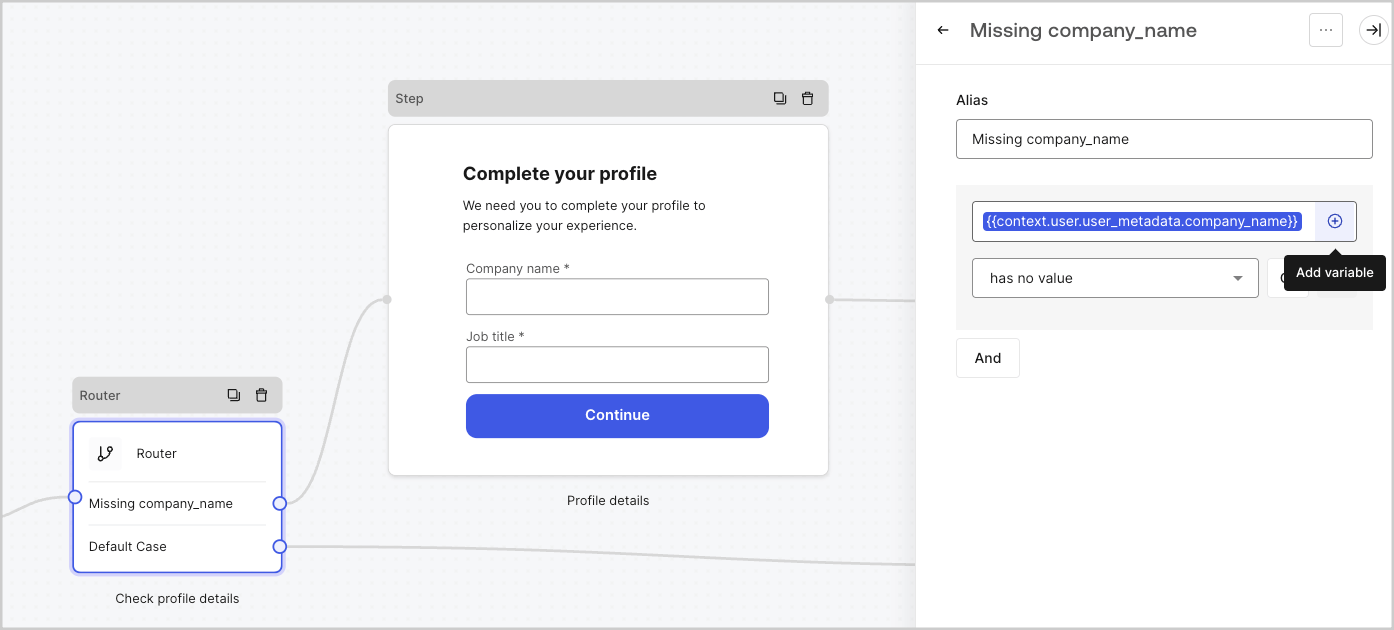
たとえば、`{{context.user.user_id}}` は `user` オブジェクトの `user_id` を参照しています。

<Frame>
  <img src="https://mintcdn.com/docs-dev-feat-init-gt-translations/AcBWN86l7cA24wcQ/docs/images/cdy7uua7fh8z/3B8DRhXO2wGqeqSFb8KbQv/0a61cdbbb7f1d290950a2ddb9857aac3/Contex-variable.png?fit=max&auto=format&n=AcBWN86l7cA24wcQ&q=85&s=1019ca2b782a15f8395ab0d2c85f5b7b" alt="Dashboard > Forms > Flows" data-og-width="1141" width="1141" data-og-height="219" height="219" data-path="docs/images/cdy7uua7fh8z/3B8DRhXO2wGqeqSFb8KbQv/0a61cdbbb7f1d290950a2ddb9857aac3/Contex-variable.png" data-optimize="true" data-opv="3" srcset="https://mintcdn.com/docs-dev-feat-init-gt-translations/AcBWN86l7cA24wcQ/docs/images/cdy7uua7fh8z/3B8DRhXO2wGqeqSFb8KbQv/0a61cdbbb7f1d290950a2ddb9857aac3/Contex-variable.png?w=280&fit=max&auto=format&n=AcBWN86l7cA24wcQ&q=85&s=4c75073d846f75363260da216f287ce2 280w, https://mintcdn.com/docs-dev-feat-init-gt-translations/AcBWN86l7cA24wcQ/docs/images/cdy7uua7fh8z/3B8DRhXO2wGqeqSFb8KbQv/0a61cdbbb7f1d290950a2ddb9857aac3/Contex-variable.png?w=560&fit=max&auto=format&n=AcBWN86l7cA24wcQ&q=85&s=2db7c7e40003ec7e83c79671009fa7a4 560w, https://mintcdn.com/docs-dev-feat-init-gt-translations/AcBWN86l7cA24wcQ/docs/images/cdy7uua7fh8z/3B8DRhXO2wGqeqSFb8KbQv/0a61cdbbb7f1d290950a2ddb9857aac3/Contex-variable.png?w=840&fit=max&auto=format&n=AcBWN86l7cA24wcQ&q=85&s=54c19ed289bee6684e2915baf67a8f4a 840w, https://mintcdn.com/docs-dev-feat-init-gt-translations/AcBWN86l7cA24wcQ/docs/images/cdy7uua7fh8z/3B8DRhXO2wGqeqSFb8KbQv/0a61cdbbb7f1d290950a2ddb9857aac3/Contex-variable.png?w=1100&fit=max&auto=format&n=AcBWN86l7cA24wcQ&q=85&s=08342ed5c61defa75609af7b9657a868 1100w, https://mintcdn.com/docs-dev-feat-init-gt-translations/AcBWN86l7cA24wcQ/docs/images/cdy7uua7fh8z/3B8DRhXO2wGqeqSFb8KbQv/0a61cdbbb7f1d290950a2ddb9857aac3/Contex-variable.png?w=1650&fit=max&auto=format&n=AcBWN86l7cA24wcQ&q=85&s=6b573b71e8c19f4397c13845cddc2c6c 1650w, https://mintcdn.com/docs-dev-feat-init-gt-translations/AcBWN86l7cA24wcQ/docs/images/cdy7uua7fh8z/3B8DRhXO2wGqeqSFb8KbQv/0a61cdbbb7f1d290950a2ddb9857aac3/Contex-variable.png?w=2500&fit=max&auto=format&n=AcBWN86l7cA24wcQ&q=85&s=65806d0b74e21fe60830e9d14ebb98e9 2500w" />
</Frame>

<div id="form-fields-variables">
  ### フォームフィールド変数
</div>

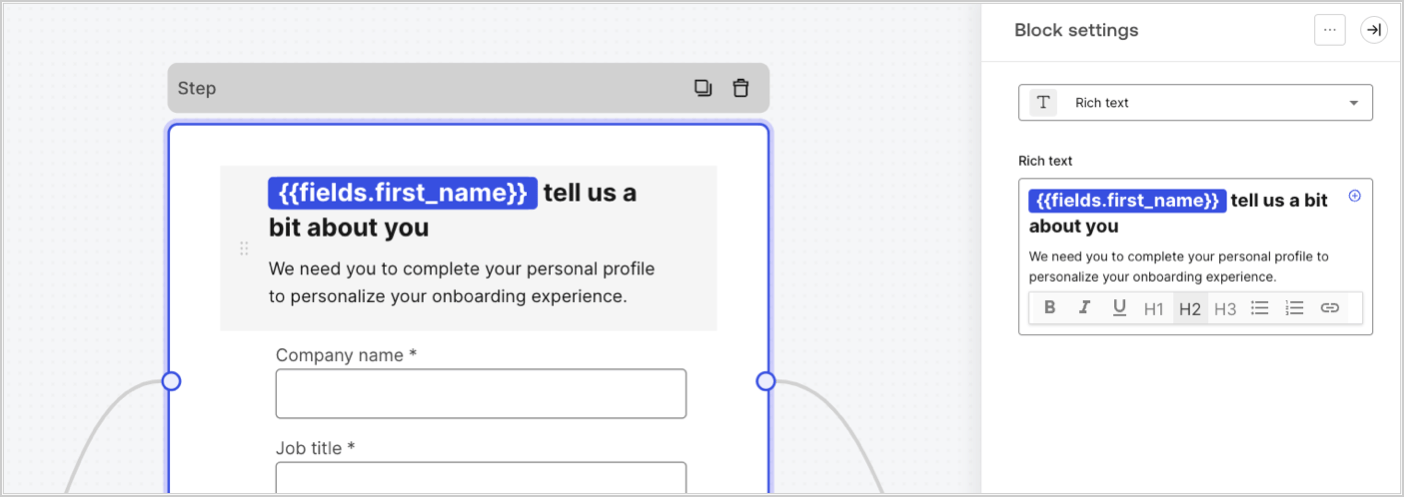
フィールド変数には、フォーム内の入力フィールドでユーザーが入力したデータと、非表示フィールドのデータが含まれます。各フィールドのデータは、フィールドの種類によって異なります。たとえば、`{{fields.first_name}}` は、ID が `first_name` のフィールドの入力値を参照します。
<Frame>
  <img src="https://mintcdn.com/docs-dev-feat-init-gt-translations/k7ye6-pv0VL5gE4A/docs/images/cdy7uua7fh8z/4D42A6ww4XvFxweoxh04Rd/016c2ed9d25bc2267ed3ed31bf8b2bf6/form-fields-variable.png?fit=max&auto=format&n=k7ye6-pv0VL5gE4A&q=85&s=a1688e1e10f864329af9a6a2dc7a6d5d" alt="Dashboard > Actions > Forms > フォーム" data-og-width="1404" width="1404" data-og-height="497" height="497" data-path="docs/images/cdy7uua7fh8z/4D42A6ww4XvFxweoxh04Rd/016c2ed9d25bc2267ed3ed31bf8b2bf6/form-fields-variable.png" data-optimize="true" data-opv="3" srcset="https://mintcdn.com/docs-dev-feat-init-gt-translations/k7ye6-pv0VL5gE4A/docs/images/cdy7uua7fh8z/4D42A6ww4XvFxweoxh04Rd/016c2ed9d25bc2267ed3ed31bf8b2bf6/form-fields-variable.png?w=280&fit=max&auto=format&n=k7ye6-pv0VL5gE4A&q=85&s=cb4c2a3ce2983bee8d64976c6e430262 280w, https://mintcdn.com/docs-dev-feat-init-gt-translations/k7ye6-pv0VL5gE4A/docs/images/cdy7uua7fh8z/4D42A6ww4XvFxweoxh04Rd/016c2ed9d25bc2267ed3ed31bf8b2bf6/form-fields-variable.png?w=560&fit=max&auto=format&n=k7ye6-pv0VL5gE4A&q=85&s=055f71cb53cf129ee83a90ff12dbe0d7 560w, https://mintcdn.com/docs-dev-feat-init-gt-translations/k7ye6-pv0VL5gE4A/docs/images/cdy7uua7fh8z/4D42A6ww4XvFxweoxh04Rd/016c2ed9d25bc2267ed3ed31bf8b2bf6/form-fields-variable.png?w=840&fit=max&auto=format&n=k7ye6-pv0VL5gE4A&q=85&s=e1cf145de69c683c9de70c9e71ad1df5 840w, https://mintcdn.com/docs-dev-feat-init-gt-translations/k7ye6-pv0VL5gE4A/docs/images/cdy7uua7fh8z/4D42A6ww4XvFxweoxh04Rd/016c2ed9d25bc2267ed3ed31bf8b2bf6/form-fields-variable.png?w=1100&fit=max&auto=format&n=k7ye6-pv0VL5gE4A&q=85&s=fe55003e32ecb36d075be81c8fbf85d0 1100w, https://mintcdn.com/docs-dev-feat-init-gt-translations/k7ye6-pv0VL5gE4A/docs/images/cdy7uua7fh8z/4D42A6ww4XvFxweoxh04Rd/016c2ed9d25bc2267ed3ed31bf8b2bf6/form-fields-variable.png?w=1650&fit=max&auto=format&n=k7ye6-pv0VL5gE4A&q=85&s=97ef023cd1d0f3481db89064e6efc219 1650w, https://mintcdn.com/docs-dev-feat-init-gt-translations/k7ye6-pv0VL5gE4A/docs/images/cdy7uua7fh8z/4D42A6ww4XvFxweoxh04Rd/016c2ed9d25bc2267ed3ed31bf8b2bf6/form-fields-variable.png?w=2500&fit=max&auto=format&n=k7ye6-pv0VL5gE4A&q=85&s=dffe22ec601036f76c3c2c6a97990a71 2500w" />
</Frame>

<div id="flow-output-actions-variables">
  ### フロー出力アクション変数
</div>

フローアクションが実行されると、後続のアクションから参照できる出力オブジェクトのレスポンスが生成されます。たとえば、`{{actions.generate_otp.code}}` は、ID が `generate_otp` のアクションの出力コードを参照します。

<Frame>
  <img src="https://mintcdn.com/docs-dev-feat-init-gt-translations/ga3rC1_4s-OF6Vr-/docs/images/cdy7uua7fh8z/6jYtEdYqSGXm3DDv0mxQ0o/2d48012629745e07137bf6ba42f4d829/flow-output-variable.png?fit=max&auto=format&n=ga3rC1_4s-OF6Vr-&q=85&s=b64de3039be55bb8c737601a969ec2c7" alt="Dashboard > Actions > Forms > Flows" data-og-width="1404" width="1404" data-og-height="253" height="253" data-path="docs/images/cdy7uua7fh8z/6jYtEdYqSGXm3DDv0mxQ0o/2d48012629745e07137bf6ba42f4d829/flow-output-variable.png" data-optimize="true" data-opv="3" srcset="https://mintcdn.com/docs-dev-feat-init-gt-translations/ga3rC1_4s-OF6Vr-/docs/images/cdy7uua7fh8z/6jYtEdYqSGXm3DDv0mxQ0o/2d48012629745e07137bf6ba42f4d829/flow-output-variable.png?w=280&fit=max&auto=format&n=ga3rC1_4s-OF6Vr-&q=85&s=3692b9ce2ff495266cdd04d8a856bf9f 280w, https://mintcdn.com/docs-dev-feat-init-gt-translations/ga3rC1_4s-OF6Vr-/docs/images/cdy7uua7fh8z/6jYtEdYqSGXm3DDv0mxQ0o/2d48012629745e07137bf6ba42f4d829/flow-output-variable.png?w=560&fit=max&auto=format&n=ga3rC1_4s-OF6Vr-&q=85&s=4da67b6f654530f2615892ed6460878e 560w, https://mintcdn.com/docs-dev-feat-init-gt-translations/ga3rC1_4s-OF6Vr-/docs/images/cdy7uua7fh8z/6jYtEdYqSGXm3DDv0mxQ0o/2d48012629745e07137bf6ba42f4d829/flow-output-variable.png?w=840&fit=max&auto=format&n=ga3rC1_4s-OF6Vr-&q=85&s=3ac1e2dcbf9257341435a75443da2425 840w, https://mintcdn.com/docs-dev-feat-init-gt-translations/ga3rC1_4s-OF6Vr-/docs/images/cdy7uua7fh8z/6jYtEdYqSGXm3DDv0mxQ0o/2d48012629745e07137bf6ba42f4d829/flow-output-variable.png?w=1100&fit=max&auto=format&n=ga3rC1_4s-OF6Vr-&q=85&s=d7a86a34b2d0b8aff70407c8a094efee 1100w, https://mintcdn.com/docs-dev-feat-init-gt-translations/ga3rC1_4s-OF6Vr-/docs/images/cdy7uua7fh8z/6jYtEdYqSGXm3DDv0mxQ0o/2d48012629745e07137bf6ba42f4d829/flow-output-variable.png?w=1650&fit=max&auto=format&n=ga3rC1_4s-OF6Vr-&q=85&s=a15e45247f7290abf8c992309468ca7d 1650w, https://mintcdn.com/docs-dev-feat-init-gt-translations/ga3rC1_4s-OF6Vr-/docs/images/cdy7uua7fh8z/6jYtEdYqSGXm3DDv0mxQ0o/2d48012629745e07137bf6ba42f4d829/flow-output-variable.png?w=2500&fit=max&auto=format&n=ga3rC1_4s-OF6Vr-&q=85&s=8176a5efa1913fd418c049db674593bb 2500w" />
</Frame>

<div id="shared-variables">
  ### 共有変数
</div>

後続の Flows や、同じトランザクション内のフォームコンポーネントで共有するための変数を保存できます。共有変数は一時的なもので、特定のフォームジャーニーに関連付けられます。これらの値にアクセスできるのは、そのジャーニー内のみです。たとえば、`{{vars.external_id}}` は、ID が `external_id` の共有変数の値を参照します。

<Frame>
  <img src="https://mintcdn.com/docs-dev-feat-init-gt-translations/k7ye6-pv0VL5gE4A/docs/images/cdy7uua7fh8z/4571ExRTHL0KZKJKX9pNwj/abb631b8608a6356b0e5b3784cf8b02f/flow-shared-variable.png?fit=max&auto=format&n=k7ye6-pv0VL5gE4A&q=85&s=2acdf9a35591000ea3b45e599f57ee46" alt="Dashboard > Actions > Forms > Flows" data-og-width="1215" width="1215" data-og-height="162" height="162" data-path="docs/images/cdy7uua7fh8z/4571ExRTHL0KZKJKX9pNwj/abb631b8608a6356b0e5b3784cf8b02f/flow-shared-variable.png" data-optimize="true" data-opv="3" srcset="https://mintcdn.com/docs-dev-feat-init-gt-translations/k7ye6-pv0VL5gE4A/docs/images/cdy7uua7fh8z/4571ExRTHL0KZKJKX9pNwj/abb631b8608a6356b0e5b3784cf8b02f/flow-shared-variable.png?w=280&fit=max&auto=format&n=k7ye6-pv0VL5gE4A&q=85&s=1e3763becae681084b8a9436a9d881f9 280w, https://mintcdn.com/docs-dev-feat-init-gt-translations/k7ye6-pv0VL5gE4A/docs/images/cdy7uua7fh8z/4571ExRTHL0KZKJKX9pNwj/abb631b8608a6356b0e5b3784cf8b02f/flow-shared-variable.png?w=560&fit=max&auto=format&n=k7ye6-pv0VL5gE4A&q=85&s=9e14a048e87c695dcea1c7c653043dbb 560w, https://mintcdn.com/docs-dev-feat-init-gt-translations/k7ye6-pv0VL5gE4A/docs/images/cdy7uua7fh8z/4571ExRTHL0KZKJKX9pNwj/abb631b8608a6356b0e5b3784cf8b02f/flow-shared-variable.png?w=840&fit=max&auto=format&n=k7ye6-pv0VL5gE4A&q=85&s=b7ed3d904936764017c10f5816c7d623 840w, https://mintcdn.com/docs-dev-feat-init-gt-translations/k7ye6-pv0VL5gE4A/docs/images/cdy7uua7fh8z/4571ExRTHL0KZKJKX9pNwj/abb631b8608a6356b0e5b3784cf8b02f/flow-shared-variable.png?w=1100&fit=max&auto=format&n=k7ye6-pv0VL5gE4A&q=85&s=a3175662812f1b18575d77e927513201 1100w, https://mintcdn.com/docs-dev-feat-init-gt-translations/k7ye6-pv0VL5gE4A/docs/images/cdy7uua7fh8z/4571ExRTHL0KZKJKX9pNwj/abb631b8608a6356b0e5b3784cf8b02f/flow-shared-variable.png?w=1650&fit=max&auto=format&n=k7ye6-pv0VL5gE4A&q=85&s=bd1d86020c8edb796b79aaebf430cbd4 1650w, https://mintcdn.com/docs-dev-feat-init-gt-translations/k7ye6-pv0VL5gE4A/docs/images/cdy7uua7fh8z/4571ExRTHL0KZKJKX9pNwj/abb631b8608a6356b0e5b3784cf8b02f/flow-shared-variable.png?w=2500&fit=max&auto=format&n=k7ye6-pv0VL5gE4A&q=85&s=a42b64114c44b5223da0fefce2c2b2b3 2500w" />
</Frame>

<Warning>
  共有変数:

  * は内部 (サーバー側) で管理され、ブラウザー (クライアント側) には公開されません。
  * フォームコンポーネント内で共有変数を参照した場合、解決されてブラウザーに公開されることがあります。
  * 機微な情報が含まれている可能性があるため、不要または意図しない公開を避けるために、共有変数にアクセスする際は注意してください。
</Warning>

<div id="helper-functions">
  ### ヘルパー関数
</div>

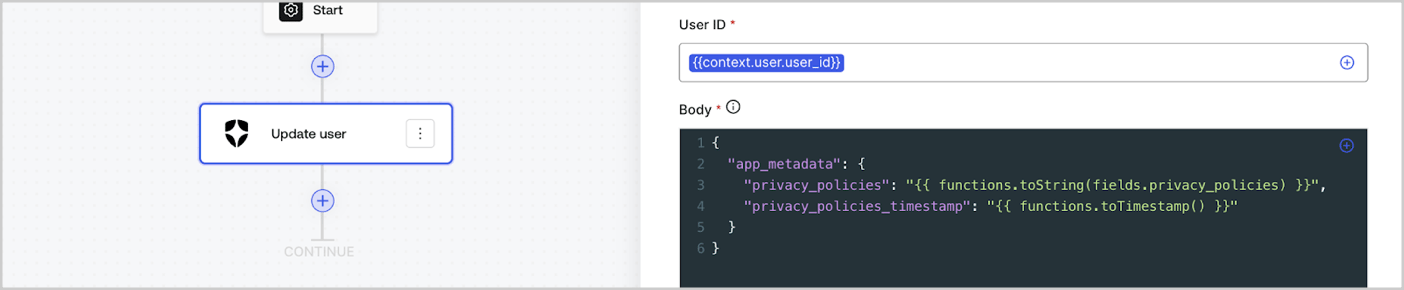
ヘルパー関数を使うと、データを変換したり、簡単な処理を行ったりできます。たとえば、`{{functions.toString(fields.privacy_policies)}}` は、ID が `privacy_policies` のフィールドの値を `toString()` 関数で変換します。
<Frame>
  <img src="https://mintcdn.com/docs-dev-feat-init-gt-translations/2ut5cR-lHY2UVI81/docs/images/cdy7uua7fh8z/1gyox33XJEtdkT43NppblT/0e878cc5ae2bde11b4207e105bbac6c5/flow-helper-functions.png?fit=max&auto=format&n=2ut5cR-lHY2UVI81&q=85&s=eaa2117ef4aae6155af9b6857faeed32" alt="Dashboard > Actions > Forms > Flows" data-og-width="1404" width="1404" data-og-height="290" height="290" data-path="docs/images/cdy7uua7fh8z/1gyox33XJEtdkT43NppblT/0e878cc5ae2bde11b4207e105bbac6c5/flow-helper-functions.png" data-optimize="true" data-opv="3" srcset="https://mintcdn.com/docs-dev-feat-init-gt-translations/2ut5cR-lHY2UVI81/docs/images/cdy7uua7fh8z/1gyox33XJEtdkT43NppblT/0e878cc5ae2bde11b4207e105bbac6c5/flow-helper-functions.png?w=280&fit=max&auto=format&n=2ut5cR-lHY2UVI81&q=85&s=97ace5949b457199f6d5ba2dbe4e9556 280w, https://mintcdn.com/docs-dev-feat-init-gt-translations/2ut5cR-lHY2UVI81/docs/images/cdy7uua7fh8z/1gyox33XJEtdkT43NppblT/0e878cc5ae2bde11b4207e105bbac6c5/flow-helper-functions.png?w=560&fit=max&auto=format&n=2ut5cR-lHY2UVI81&q=85&s=6f5bd5efc63d3e7a25cb237cea6af7f8 560w, https://mintcdn.com/docs-dev-feat-init-gt-translations/2ut5cR-lHY2UVI81/docs/images/cdy7uua7fh8z/1gyox33XJEtdkT43NppblT/0e878cc5ae2bde11b4207e105bbac6c5/flow-helper-functions.png?w=840&fit=max&auto=format&n=2ut5cR-lHY2UVI81&q=85&s=b89a5c470a07f93e9ede774760432e9e 840w, https://mintcdn.com/docs-dev-feat-init-gt-translations/2ut5cR-lHY2UVI81/docs/images/cdy7uua7fh8z/1gyox33XJEtdkT43NppblT/0e878cc5ae2bde11b4207e105bbac6c5/flow-helper-functions.png?w=1100&fit=max&auto=format&n=2ut5cR-lHY2UVI81&q=85&s=dd9c7db4878e23b4736633fa34074607 1100w, https://mintcdn.com/docs-dev-feat-init-gt-translations/2ut5cR-lHY2UVI81/docs/images/cdy7uua7fh8z/1gyox33XJEtdkT43NppblT/0e878cc5ae2bde11b4207e105bbac6c5/flow-helper-functions.png?w=1650&fit=max&auto=format&n=2ut5cR-lHY2UVI81&q=85&s=1fa25d3a10ffb0ca8672fe2aa3799b59 1650w, https://mintcdn.com/docs-dev-feat-init-gt-translations/2ut5cR-lHY2UVI81/docs/images/cdy7uua7fh8z/1gyox33XJEtdkT43NppblT/0e878cc5ae2bde11b4207e105bbac6c5/flow-helper-functions.png?w=2500&fit=max&auto=format&n=2ut5cR-lHY2UVI81&q=85&s=49267a66a556307e8edd1a07839f3e1b 2500w" />
</Frame>

使用できるヘルパー関数は次のとおりです。

| 関数                                       | 説明                                                                                                                                                                                                              | 例                                                                                                                |
| ---------------------------------------- | --------------------------------------------------------------------------------------------------------------------------------------------------------------------------------------------------------------- | ---------------------------------------------------------------------------------------------------------------- |
| `toArray(value)`                         | 値を配列に変換します。                                                                                                                                                                                                     | `{{ functions.toArray('abc') }} // ['abc']`                                                                      |
| `toBoolean(value)`                       | 値を真偽値に変換します。                                                                                                                                                                                                    | `{{ functions.toBoolean(1) }} // true&lt;br /&gt;&lt;br /&gt;\{\{ functions.toBoolean(0) }} // false`            |
| `length(value)`                          | 引数の値の長さを返します。                                                                                                                                                                                                   | `{{ functions.length('auth0') }} // 5`                                                                           |
| `mask(value)`                            | Executionsで値が表示されないようにマスクします。                                                                                                                                                                                   | `{{ functions.mask('my_awesome_secret') }} // ███`                                                               |
| `toNumber(value)`                        | 値を数値に変換します。                                                                                                                                                                                                     | `{{ functions.toNumber('123') }} // 123`                                                                         |
| `random(min, max, [boolean])`            | min 以上 max 以下の範囲のランダムな数値を返します。                                                                                                                                                                                  | `{{ functions.random(0, 6) }} // 4 &lt;br /&gt;&lt;br /&gt;\{\{ functions.random(0, 6, true) }} // 3.8523497...` |
| `slice(value, start, end)`               | 開始インデックスから終了インデックスまでの、値の配列または文字列の一部を返します。                                                                                                                                                                       | `{{ functions.slice( 'example', 3, 5) }} // 'mp'`                                                                |
| `toString(value)`                        | 値を文字列に変換します。                                                                                                                                                                                                    | `{{ functions.toString(123) }} // '123'`                                                                         |
| `substring(value, start, end)`           | 値の開始インデックスから終了インデックスまでの部分を返します。[slice 関数と substring 関数の違い](https://developer.mozilla.org/en-US/docs/Web/JavaScript/Reference/Global_Objects/String/substring#differences_between_substring_and_slice)についてご覧ください | `{{ functions.substring( 'example’', 3, 5) }} // 'mp'`                                                           |
| `toTimestamp()`                          | 現在の UNIX タイムスタンプを返します。                                                                                                                                                                                          | `{{ functions.toTimestamp() }} // 1628761483`                                                                    |
| `toTimestamp(date)`                      | 指定した日付をUNIX時刻で返します。                                                                                                                                                                                             | `{{ functions.toTimestamp('2021-04-30T10:02:50.876Z') }} // 1619776970`                                          |
| `toTimestamp(date)`                      | 指定した日付をUNIX時刻で返します。                                                                                                                                                                                             | `{{ functions.toTimestamp('2021-04-30T10:02:50.876Z') }} // 1619776970`                                          |
| `toLowerCase(value)`                     | 小文字に変換された新しい文字列を返します。                                                                                                                                                                                           | `{{ functions.toLowerCase('JohnDoe 1234') }} // johndoe 1234`                                                    |
| `toUpperCase(value)`                     | 大文字に変換された新しい文字列を返します。                                                                                                                                                                                           | `{{ functions.toUpperCase('JohnDoe 1234') }} // JOHNDOE 1234`                                                    |
| `replaceAll(value, string, replacement)` | パターンに一致するすべての箇所を置換文字列に置き換えた新しい文字列を返します。                                                                                                                                                                         | `{{ functions.replaceAll('2021-04-30', '-', '/') }} // 2021/04/30`                                               |
| `replace(value, string, replacement)`    | パターンに一致する箇所を置換文字列に置き換えた新しい文字列を返します。pattern が文字列の場合は、最初に出現した箇所のみが置き換えられます。                                                                                                                                       | `{{ functions.replace('2021-04-30', '-', '/') }} // 2021/04-30`                                                  |
| `split(value, separator, limit?)`        | 区切り文字で分割した部分文字列の順序付きリストを返します。                                                                                                                                                                                   | `{{ functions.split('2021-04-30', '-') }} // ['2021', '04', '30']`                                               |
| `now()`                                  | 現在の日時を ISO 8601 形式で返します。                                                                                                                                                                                        | `{{ functions.now() }} // 2021-04-30T10:31:28.576Z`                                                              |
| `includes(collection, item, fromIndex?)` | 配列に特定の値が含まれているかどうかを返します。                                                                                                                                                                                        | `{{ functions.includes(['auth0', 'identity', 'authentication'], 'identity') }} // true`                          |
| `indexOf(collection, item, fromIndex?)`  | 配列内で指定した要素が最初に見つかるインデックスを返し、存在しない場合は -1 を返します。                                                                                                                                                                  | `{{ functions.indexOf(['auth0', 'identity', 'authentication'], 'identity') }} // 1`                              |
| `merge(base, value)`                     | ベースのデータ型に応じて、配列やオブジェクトをマージするか、文字列を連結した結果を返します。                                                                                                                                                                  | `{{ functions.merge(['auth0', 'identity'], ['authentication']) }} // ['auth0', 'identity', 'authentication']`    |
| `md5(value)`                             | MD5 ハッシュ値を返します。                                                                                                                                                                                                 | `{{ functions.md5('auth0') }} // 7bbb597...`                                                                     |
| `sha1(value)`                            | SHA1ハッシュ値を返します。                                                                                                                                                                                                 | `{{ functions.sha1('auth0') }} // b4ec5339...`                                                                   |
| `sha256(value)`                          | SHA256ハッシュ値を返します。                                                                                                                                                                                               | `{{ functions.sha256('auth0') }} // d9082bdc...`                                                                 |
| `sha512(value)`                          | SHA512ハッシュ値を返します。                                                                                                                                                                                               | `{{ functions.sha512('auth0') }} // c0d588069d...`                                                               |
| `uuid()`                                 | ランダムな v4 UUID を返します。                                                                                                                                                                                            | `{{ functions.uuid() }} // 36b8f84d-df4e-4d49-b662-bcde71a8764`                                                  |

<div id="variables-best-practices">
  ## 変数のベストプラクティス
</div>

<div id="use-meaningful-ids">
  ### 意味のあるIDを使用する
</div>

FormフィールドやFlowアクションを追加すると、IDは自動的に生成されます。

IDは、どの情報が入っているか分かるように、より具体的で分かりやすい値に更新してください。たとえば、ユーザーの名を保存するFormフィールドを作成する場合は、IDを`first_name`に変更します。

<div id="be-mindful-when-updating-existing-ids">
  ### 既存のIDを更新する際は注意してください
</div>

変数がすでに使用されていてIDを変更する必要がある場合は、そのIDをどこで参照しているかを確認し、`undefined` や空の値が発生しないよう、該当箇所のIDもあわせて更新してください。

<div id="check-flow-executions">
  ### Flow の実行を確認する
</div>

想定外の変数の値が表示された場合は、[**Executions**](/docs/ja-jp/customize/forms/flows/flow-execution-and-debugger) ビューを使って変数の問題を調査してください。

<div id="use-the-autocomplete-menu">
  ### オートコンプリートメニューを使用する
</div>

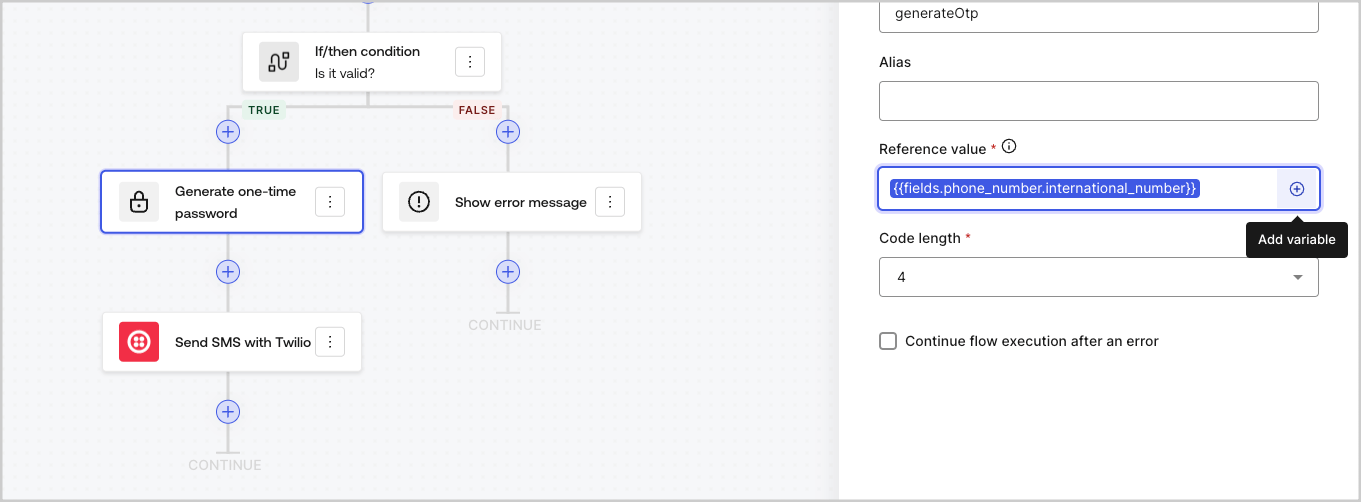
オートコンプリートメニューを使うと、既存の変数を見つけて正しく参照できます。
<Frame>
  <img src="https://mintcdn.com/docs-dev-feat-init-gt-translations/AcBWN86l7cA24wcQ/docs/images/cdy7uua7fh8z/3SKnDuaMzSImxZtDDAoZaz/9ea800fad29ef71d1ded3c72b87660a4/Autocomplete-flows.png?fit=max&auto=format&n=AcBWN86l7cA24wcQ&q=85&s=312f5a27551095ebcbc96868ebcdca26" alt="Dashboard > Actions > Forms > Flows" data-og-width="1361" width="1361" data-og-height="502" height="502" data-path="docs/images/cdy7uua7fh8z/3SKnDuaMzSImxZtDDAoZaz/9ea800fad29ef71d1ded3c72b87660a4/Autocomplete-flows.png" data-optimize="true" data-opv="3" srcset="https://mintcdn.com/docs-dev-feat-init-gt-translations/AcBWN86l7cA24wcQ/docs/images/cdy7uua7fh8z/3SKnDuaMzSImxZtDDAoZaz/9ea800fad29ef71d1ded3c72b87660a4/Autocomplete-flows.png?w=280&fit=max&auto=format&n=AcBWN86l7cA24wcQ&q=85&s=af21e01b54fbf9fffbaa232ce7065d97 280w, https://mintcdn.com/docs-dev-feat-init-gt-translations/AcBWN86l7cA24wcQ/docs/images/cdy7uua7fh8z/3SKnDuaMzSImxZtDDAoZaz/9ea800fad29ef71d1ded3c72b87660a4/Autocomplete-flows.png?w=560&fit=max&auto=format&n=AcBWN86l7cA24wcQ&q=85&s=dd44c7912d3eec9db0d4c91f4899d909 560w, https://mintcdn.com/docs-dev-feat-init-gt-translations/AcBWN86l7cA24wcQ/docs/images/cdy7uua7fh8z/3SKnDuaMzSImxZtDDAoZaz/9ea800fad29ef71d1ded3c72b87660a4/Autocomplete-flows.png?w=840&fit=max&auto=format&n=AcBWN86l7cA24wcQ&q=85&s=22404543365027d4d67d3e022dddaab2 840w, https://mintcdn.com/docs-dev-feat-init-gt-translations/AcBWN86l7cA24wcQ/docs/images/cdy7uua7fh8z/3SKnDuaMzSImxZtDDAoZaz/9ea800fad29ef71d1ded3c72b87660a4/Autocomplete-flows.png?w=1100&fit=max&auto=format&n=AcBWN86l7cA24wcQ&q=85&s=4cee1c86849c53a6a3023712ef3924b2 1100w, https://mintcdn.com/docs-dev-feat-init-gt-translations/AcBWN86l7cA24wcQ/docs/images/cdy7uua7fh8z/3SKnDuaMzSImxZtDDAoZaz/9ea800fad29ef71d1ded3c72b87660a4/Autocomplete-flows.png?w=1650&fit=max&auto=format&n=AcBWN86l7cA24wcQ&q=85&s=60387b1ee1367790752c2ac9afdbf7c2 1650w, https://mintcdn.com/docs-dev-feat-init-gt-translations/AcBWN86l7cA24wcQ/docs/images/cdy7uua7fh8z/3SKnDuaMzSImxZtDDAoZaz/9ea800fad29ef71d1ded3c72b87660a4/Autocomplete-flows.png?w=2500&fit=max&auto=format&n=AcBWN86l7cA24wcQ&q=85&s=c2e4d9cf84c01726efea294c791a697c 2500w" />
</Frame>

<Frame>
  <img src="https://mintcdn.com/docs-dev-feat-init-gt-translations/AcBWN86l7cA24wcQ/docs/images/cdy7uua7fh8z/2kjRKozVgrd2a7UJXOANaN/ee5452d7210cd2f13b0e97763f11c82a/Autocomplete-forms.png?fit=max&auto=format&n=AcBWN86l7cA24wcQ&q=85&s=2abe80bd39024c93c026486613d438d2" alt="Dashboard > Actions > Forms > Form" data-og-width="1394" width="1394" data-og-height="630" height="630" data-path="docs/images/cdy7uua7fh8z/2kjRKozVgrd2a7UJXOANaN/ee5452d7210cd2f13b0e97763f11c82a/Autocomplete-forms.png" data-optimize="true" data-opv="3" srcset="https://mintcdn.com/docs-dev-feat-init-gt-translations/AcBWN86l7cA24wcQ/docs/images/cdy7uua7fh8z/2kjRKozVgrd2a7UJXOANaN/ee5452d7210cd2f13b0e97763f11c82a/Autocomplete-forms.png?w=280&fit=max&auto=format&n=AcBWN86l7cA24wcQ&q=85&s=d5c1f95a30a5daf869635f6f9749289b 280w, https://mintcdn.com/docs-dev-feat-init-gt-translations/AcBWN86l7cA24wcQ/docs/images/cdy7uua7fh8z/2kjRKozVgrd2a7UJXOANaN/ee5452d7210cd2f13b0e97763f11c82a/Autocomplete-forms.png?w=560&fit=max&auto=format&n=AcBWN86l7cA24wcQ&q=85&s=24d831058c187827fc17c9f60709770d 560w, https://mintcdn.com/docs-dev-feat-init-gt-translations/AcBWN86l7cA24wcQ/docs/images/cdy7uua7fh8z/2kjRKozVgrd2a7UJXOANaN/ee5452d7210cd2f13b0e97763f11c82a/Autocomplete-forms.png?w=840&fit=max&auto=format&n=AcBWN86l7cA24wcQ&q=85&s=6cb7917753169d648cdfc23833168964 840w, https://mintcdn.com/docs-dev-feat-init-gt-translations/AcBWN86l7cA24wcQ/docs/images/cdy7uua7fh8z/2kjRKozVgrd2a7UJXOANaN/ee5452d7210cd2f13b0e97763f11c82a/Autocomplete-forms.png?w=1100&fit=max&auto=format&n=AcBWN86l7cA24wcQ&q=85&s=ad634be3585a01ba1451050ac1563fdd 1100w, https://mintcdn.com/docs-dev-feat-init-gt-translations/AcBWN86l7cA24wcQ/docs/images/cdy7uua7fh8z/2kjRKozVgrd2a7UJXOANaN/ee5452d7210cd2f13b0e97763f11c82a/Autocomplete-forms.png?w=1650&fit=max&auto=format&n=AcBWN86l7cA24wcQ&q=85&s=c27d0987d3f0a3c8ad7e4d9297d83d38 1650w, https://mintcdn.com/docs-dev-feat-init-gt-translations/AcBWN86l7cA24wcQ/docs/images/cdy7uua7fh8z/2kjRKozVgrd2a7UJXOANaN/ee5452d7210cd2f13b0e97763f11c82a/Autocomplete-forms.png?w=2500&fit=max&auto=format&n=AcBWN86l7cA24wcQ&q=85&s=d927a7041cfe10de6f35b19f90e2580f 2500w" />
</Frame>