> ## Documentation Index
> Fetch the complete documentation index at: https://docs-dev-feat-init-gt-translations.mintlify.site/llms.txt
> Use this file to discover all available pages before exploring further.
> Auth0 テナントを Resource App の認可サーバーとして構成し、ID-JAG リクエストを受け付けて API 用のアクセストークンを発行できるようにします。
# Auth0 を Resource App として設定する
export const ReleaseStageNotice = ({feature, stage, plans, contact, terms}) => {
const stageTextMap = {
"beta": "Beta",
"ea": "早期アクセス"
};
const stageText = stageTextMap[stage] || "製品リリース段階";
const prsLink = "/docs/troubleshoot/product-lifecycle/product-release-stages";
const linkify = (text, url) => {
return {text};
};
const includeDetails = (plans, contact, terms) => {
const hasDetails = terms || plans || contact;
if (!hasDetails) return null;
return
{plans && <>この機能は{linkify(`${plans}プラン`, "https://auth0.com/pricing")}でご利用いただけます。 }
{contact && "参加をご希望の場合は、" + contact + "までお問い合わせください。 "}
{terms && <>この機能を使用することにより、Oktaの該当する無料トライアル規約および{linkify("Master Subscription Agreement", "https://www.okta.com/legal")}に同意したものとみなされます。}
;
};
return
{feature}機能は現在、{linkify(stageText, prsLink)}です。
{includeDetails(plans, contact, terms)}
;
};
Auth0 テナントを Resource App の認可サーバーとして構成すれば、SaaS アプリケーションはコードを一切変更することなく、受信した [ID-JAG](https://datatracker.ietf.org/doc/draft-ietf-oauth-identity-assertion-authz-grant/) リクエストを受け付けられるようになります。これにより、こうしたリクエストに応じてアクセストークンを発行できるため、AI エージェントやその他のアプリケーションがユーザーに代わって MCP や SaaS API をシームレスに利用できます。
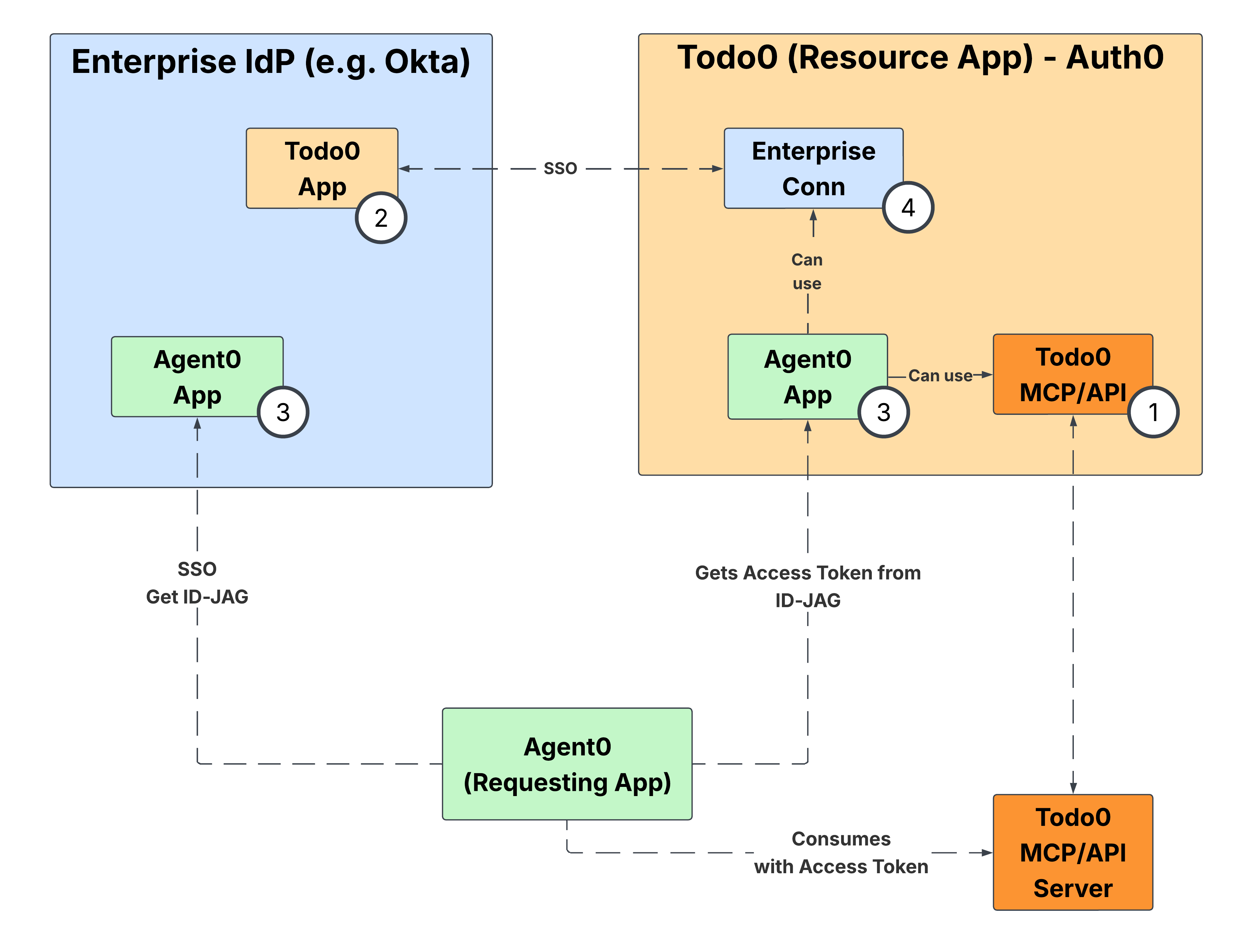
はじめに
Auth0 テナントを Resource App として構成するには、次の手順に従います。
1. [環境の設定](/docs/ja-jp/ai-agents-mcp/cross-app-access/set-up-xaa-test-environment)を完了し、APIを構成して、テスト用の Requesting App を Auth0 テナントに登録します。
2. フェデレーションに使用するIdPとプロトコルに応じて、IdP Integration の該当するガイド ([Okta as OIDC IdP](/docs/ja-jp/ai-agents-mcp/cross-app-access/idp/okta-as-oidc-idp) または [Okta as SAML IdP](/docs/ja-jp/ai-agents-mcp/cross-app-access/idp/okta-as-saml-idp)) に従って、enterprise IdPを構成します。
3. 両方の構成が完了したら、[エンドツーエンドのテスト](/docs/ja-jp/ai-agents-mcp/cross-app-access/end-to-end-testing)を参照して、XAA flow全体を検証します。