> ## Documentation Index
> Fetch the complete documentation index at: https://docs-dev-feat-init-gt-translations.mintlify.site/llms.txt
> Use this file to discover all available pages before exploring further.

> Learn how to build server side logic using Flows to add decision logic and external integrations to Forms.

# Flows

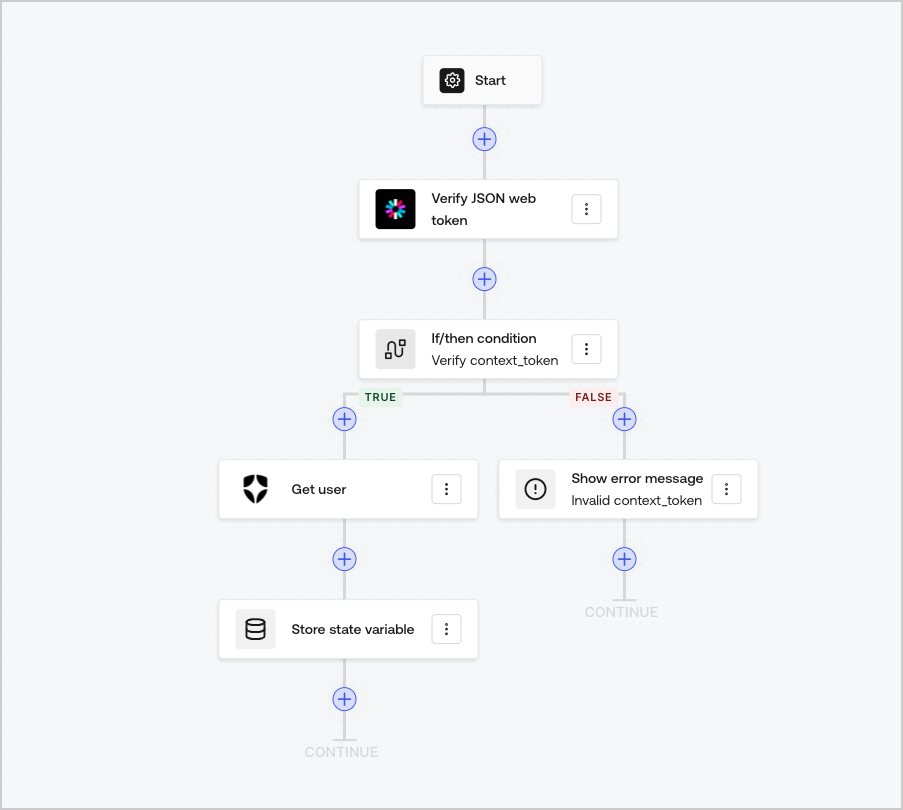
Flows allow you to visually build the server-side logic that can be executed within your Forms and handle the collected information, integrate any service with an API or trigger automations.
<Frame>
  <img src="https://mintcdn.com/docs-dev-feat-init-gt-translations/ga3rC1_4s-OF6Vr-/docs/images/cdy7uua7fh8z/6u6Huh5CbH3GEQJv3AH7cx/e49ea613b2c46a43c83c89ffecddbafe/Flows.png?fit=max&auto=format&n=ga3rC1_4s-OF6Vr-&q=85&s=e1296fb31f6c09adc68bb509e9b39b82" alt="Dashboard > Forms > Flows" data-og-width="903" width="903" data-og-height="810" height="810" data-path="docs/images/cdy7uua7fh8z/6u6Huh5CbH3GEQJv3AH7cx/e49ea613b2c46a43c83c89ffecddbafe/Flows.png" data-optimize="true" data-opv="3" srcset="https://mintcdn.com/docs-dev-feat-init-gt-translations/ga3rC1_4s-OF6Vr-/docs/images/cdy7uua7fh8z/6u6Huh5CbH3GEQJv3AH7cx/e49ea613b2c46a43c83c89ffecddbafe/Flows.png?w=280&fit=max&auto=format&n=ga3rC1_4s-OF6Vr-&q=85&s=7a2eb0a56351b19c9be4daa161e841d3 280w, https://mintcdn.com/docs-dev-feat-init-gt-translations/ga3rC1_4s-OF6Vr-/docs/images/cdy7uua7fh8z/6u6Huh5CbH3GEQJv3AH7cx/e49ea613b2c46a43c83c89ffecddbafe/Flows.png?w=560&fit=max&auto=format&n=ga3rC1_4s-OF6Vr-&q=85&s=c095b460673428f8157943b07eba20aa 560w, https://mintcdn.com/docs-dev-feat-init-gt-translations/ga3rC1_4s-OF6Vr-/docs/images/cdy7uua7fh8z/6u6Huh5CbH3GEQJv3AH7cx/e49ea613b2c46a43c83c89ffecddbafe/Flows.png?w=840&fit=max&auto=format&n=ga3rC1_4s-OF6Vr-&q=85&s=f4de9fcec2cbbcce5829178111d71491 840w, https://mintcdn.com/docs-dev-feat-init-gt-translations/ga3rC1_4s-OF6Vr-/docs/images/cdy7uua7fh8z/6u6Huh5CbH3GEQJv3AH7cx/e49ea613b2c46a43c83c89ffecddbafe/Flows.png?w=1100&fit=max&auto=format&n=ga3rC1_4s-OF6Vr-&q=85&s=d61e3a892380c4506bc9c96cf13f0dd0 1100w, https://mintcdn.com/docs-dev-feat-init-gt-translations/ga3rC1_4s-OF6Vr-/docs/images/cdy7uua7fh8z/6u6Huh5CbH3GEQJv3AH7cx/e49ea613b2c46a43c83c89ffecddbafe/Flows.png?w=1650&fit=max&auto=format&n=ga3rC1_4s-OF6Vr-&q=85&s=ac9283dcadd8c767ec86246f0d80338b 1650w, https://mintcdn.com/docs-dev-feat-init-gt-translations/ga3rC1_4s-OF6Vr-/docs/images/cdy7uua7fh8z/6u6Huh5CbH3GEQJv3AH7cx/e49ea613b2c46a43c83c89ffecddbafe/Flows.png?w=2500&fit=max&auto=format&n=ga3rC1_4s-OF6Vr-&q=85&s=7ace1f7f366b9625570ad14cac4354b9 2500w" />
</Frame>

You can use Flows actions with your form to:

* Create custom server-side validations for your form steps.
* Integrate with your own API making custom HTTP requests.
* Integrate with 3rd parties using our out-of-the-box integrations.
* Execute different business logic based based on user input or properties.
* Validate data using <Tooltip tip="JSON Web Token (JWT): Standard ID Token format (and often Access Token format) used to represent claims securely between two parties." cta="View Glossary" href="/docs/glossary?term=JSON+Web+Tokens">JSON Web Tokens</Tooltip>.
