> ## Documentation Index
> Fetch the complete documentation index at: https://docs-dev-feat-init-gt-translations.mintlify.site/llms.txt
> Use this file to discover all available pages before exploring further.

> Learn how to configure an update policy form using Forms for Actions for users to review and accept new terms of service or consent updates.

# Use Cases: Configure an update policy form using Forms

<Card title="Before you start">
  1. Create a [Machine-to-Machine Application](/docs/get-started/auth0-overview/create-applications/machine-to-machine-apps) with the following scopes enabled:

  * `read:users`
  * `update:users`
  * `create:users`
  * `read:users_app_metadata`
  * `update:users_app_metadata`
  * `create:users_app_metadata`

  2. Add a [Vault connection](/docs/customize/forms/vault) using the M2M application credentials.
</Card>

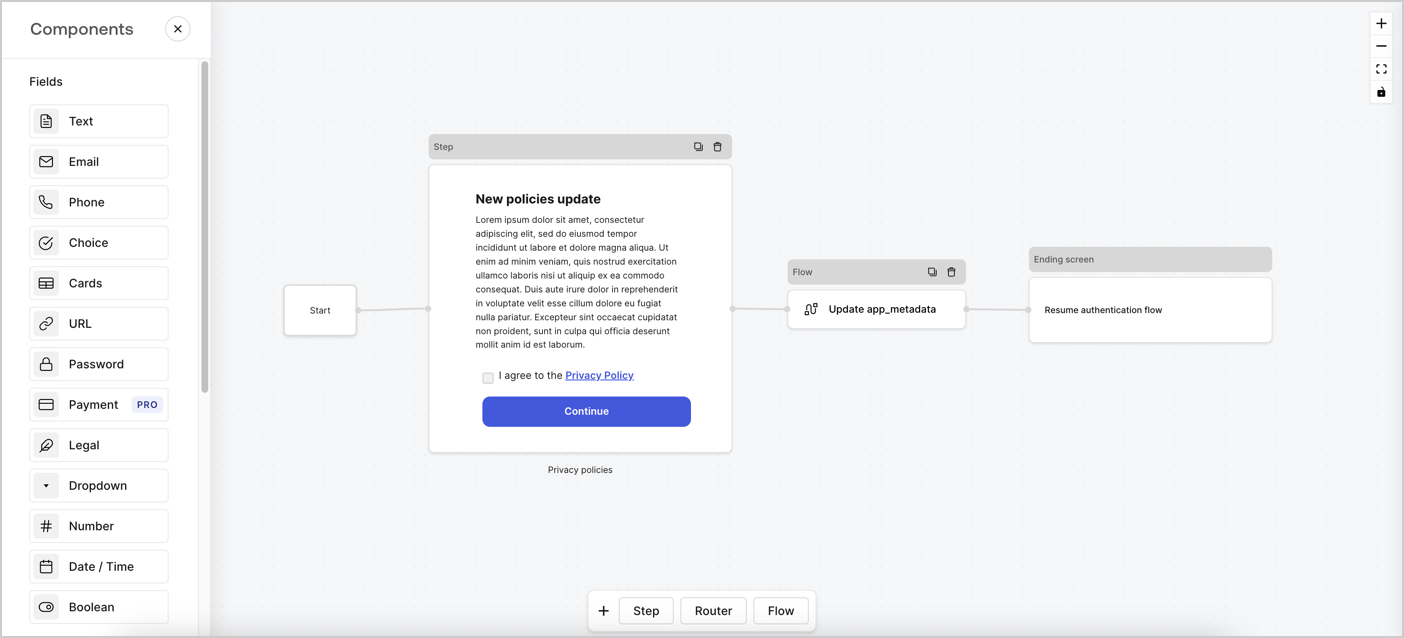
Forms for Actions allows you to create custom privacy policies flows and store the consent under the `app_metadata` object.
<Frame>
  <img src="https://mintcdn.com/docs-dev-feat-init-gt-translations/ga3rC1_4s-OF6Vr-/docs/images/cdy7uua7fh8z/6i68dMvHDTijfRmSgN1x8Q/ad900e7d4c0fb34645921435472b8684/privavy-policy-form.png?fit=max&auto=format&n=ga3rC1_4s-OF6Vr-&q=85&s=80e447f04766c9b07f83c8ba8d8d0cbc" alt="Dashboard > Actions > Forms > Privacy policy use case" data-og-width="1404" width="1404" data-og-height="638" height="638" data-path="docs/images/cdy7uua7fh8z/6i68dMvHDTijfRmSgN1x8Q/ad900e7d4c0fb34645921435472b8684/privavy-policy-form.png" data-optimize="true" data-opv="3" srcset="https://mintcdn.com/docs-dev-feat-init-gt-translations/ga3rC1_4s-OF6Vr-/docs/images/cdy7uua7fh8z/6i68dMvHDTijfRmSgN1x8Q/ad900e7d4c0fb34645921435472b8684/privavy-policy-form.png?w=280&fit=max&auto=format&n=ga3rC1_4s-OF6Vr-&q=85&s=e19a409e9b20f4eeb57d8230bd9d60af 280w, https://mintcdn.com/docs-dev-feat-init-gt-translations/ga3rC1_4s-OF6Vr-/docs/images/cdy7uua7fh8z/6i68dMvHDTijfRmSgN1x8Q/ad900e7d4c0fb34645921435472b8684/privavy-policy-form.png?w=560&fit=max&auto=format&n=ga3rC1_4s-OF6Vr-&q=85&s=846a14811363d97ba72a0cdc3a98a1be 560w, https://mintcdn.com/docs-dev-feat-init-gt-translations/ga3rC1_4s-OF6Vr-/docs/images/cdy7uua7fh8z/6i68dMvHDTijfRmSgN1x8Q/ad900e7d4c0fb34645921435472b8684/privavy-policy-form.png?w=840&fit=max&auto=format&n=ga3rC1_4s-OF6Vr-&q=85&s=1a949c00e021c515a359ff9adc40dda1 840w, https://mintcdn.com/docs-dev-feat-init-gt-translations/ga3rC1_4s-OF6Vr-/docs/images/cdy7uua7fh8z/6i68dMvHDTijfRmSgN1x8Q/ad900e7d4c0fb34645921435472b8684/privavy-policy-form.png?w=1100&fit=max&auto=format&n=ga3rC1_4s-OF6Vr-&q=85&s=8799a7581e162fa2e5ca5afcdea7d603 1100w, https://mintcdn.com/docs-dev-feat-init-gt-translations/ga3rC1_4s-OF6Vr-/docs/images/cdy7uua7fh8z/6i68dMvHDTijfRmSgN1x8Q/ad900e7d4c0fb34645921435472b8684/privavy-policy-form.png?w=1650&fit=max&auto=format&n=ga3rC1_4s-OF6Vr-&q=85&s=8c9ab0bb71be638a0cb27e2c25ca11fc 1650w, https://mintcdn.com/docs-dev-feat-init-gt-translations/ga3rC1_4s-OF6Vr-/docs/images/cdy7uua7fh8z/6i68dMvHDTijfRmSgN1x8Q/ad900e7d4c0fb34645921435472b8684/privavy-policy-form.png?w=2500&fit=max&auto=format&n=ga3rC1_4s-OF6Vr-&q=85&s=3467a4768075a6589a841a5fd6065392 2500w" />
</Frame>

The sections below outline how you can create an Update Policy form using nodes and flows, along with steps for adding your form to a [Post Login](/docs/customize/actions/explore-triggers/signup-and-login-triggers/login-trigger) Action.

## Create a form from scratch

Follow these steps to create a form to gather information:

1. Open the Form editor by selecting **Auth0 Dashboard > Actions > Forms.**
2. Select **Create Form** > **Start from scratch**.

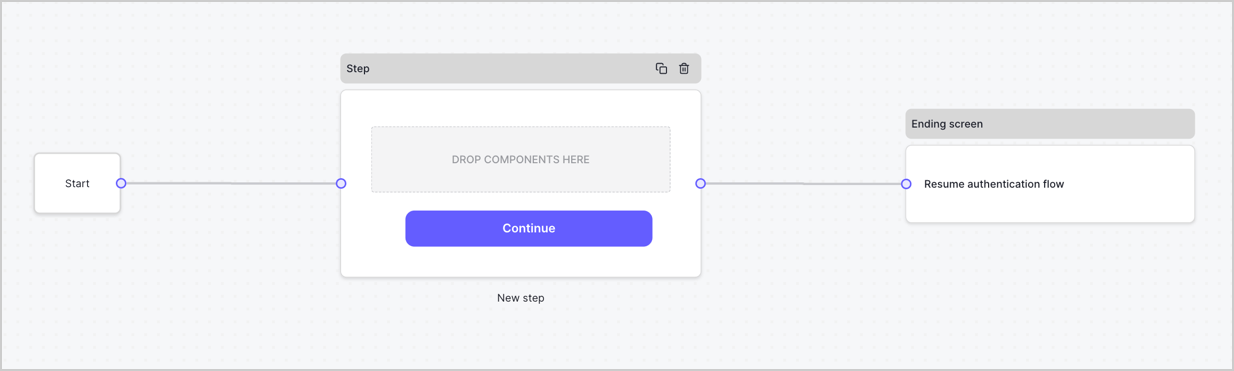
By default, a new form contains a Start node, a Step node, and an Ending screen node.
<Frame>
  <img src="https://mintcdn.com/docs-dev-feat-init-gt-translations/AcBWN86l7cA24wcQ/docs/images/cdy7uua7fh8z/2TZ9jSjgEcARFpULI6hz4R/a4319a1bd482f2ee5cc23100fdb2f42c/New-form-Forms-for-action-use-case.png?fit=max&auto=format&n=AcBWN86l7cA24wcQ&q=85&s=6a3bfd381941785615a3a8979f75d48a" alt="Dashboard > Forms > Use Cases > Form" data-og-width="1234" width="1234" data-og-height="371" height="371" data-path="docs/images/cdy7uua7fh8z/2TZ9jSjgEcARFpULI6hz4R/a4319a1bd482f2ee5cc23100fdb2f42c/New-form-Forms-for-action-use-case.png" data-optimize="true" data-opv="3" srcset="https://mintcdn.com/docs-dev-feat-init-gt-translations/AcBWN86l7cA24wcQ/docs/images/cdy7uua7fh8z/2TZ9jSjgEcARFpULI6hz4R/a4319a1bd482f2ee5cc23100fdb2f42c/New-form-Forms-for-action-use-case.png?w=280&fit=max&auto=format&n=AcBWN86l7cA24wcQ&q=85&s=bf0f92d94110edb4b874b91bb0e98464 280w, https://mintcdn.com/docs-dev-feat-init-gt-translations/AcBWN86l7cA24wcQ/docs/images/cdy7uua7fh8z/2TZ9jSjgEcARFpULI6hz4R/a4319a1bd482f2ee5cc23100fdb2f42c/New-form-Forms-for-action-use-case.png?w=560&fit=max&auto=format&n=AcBWN86l7cA24wcQ&q=85&s=2e1e0de292431110508a0cc9e342d6e2 560w, https://mintcdn.com/docs-dev-feat-init-gt-translations/AcBWN86l7cA24wcQ/docs/images/cdy7uua7fh8z/2TZ9jSjgEcARFpULI6hz4R/a4319a1bd482f2ee5cc23100fdb2f42c/New-form-Forms-for-action-use-case.png?w=840&fit=max&auto=format&n=AcBWN86l7cA24wcQ&q=85&s=230f131d16869cbde79b8598f5398e4c 840w, https://mintcdn.com/docs-dev-feat-init-gt-translations/AcBWN86l7cA24wcQ/docs/images/cdy7uua7fh8z/2TZ9jSjgEcARFpULI6hz4R/a4319a1bd482f2ee5cc23100fdb2f42c/New-form-Forms-for-action-use-case.png?w=1100&fit=max&auto=format&n=AcBWN86l7cA24wcQ&q=85&s=2eddce68293a63c174f95bd37418f105 1100w, https://mintcdn.com/docs-dev-feat-init-gt-translations/AcBWN86l7cA24wcQ/docs/images/cdy7uua7fh8z/2TZ9jSjgEcARFpULI6hz4R/a4319a1bd482f2ee5cc23100fdb2f42c/New-form-Forms-for-action-use-case.png?w=1650&fit=max&auto=format&n=AcBWN86l7cA24wcQ&q=85&s=50b62c46a234d62898f69d216e505578 1650w, https://mintcdn.com/docs-dev-feat-init-gt-translations/AcBWN86l7cA24wcQ/docs/images/cdy7uua7fh8z/2TZ9jSjgEcARFpULI6hz4R/a4319a1bd482f2ee5cc23100fdb2f42c/New-form-Forms-for-action-use-case.png?w=2500&fit=max&auto=format&n=AcBWN86l7cA24wcQ&q=85&s=1578043a5a0255d5f41140f905b00afa 2500w" />
</Frame>

### Configure the Step node

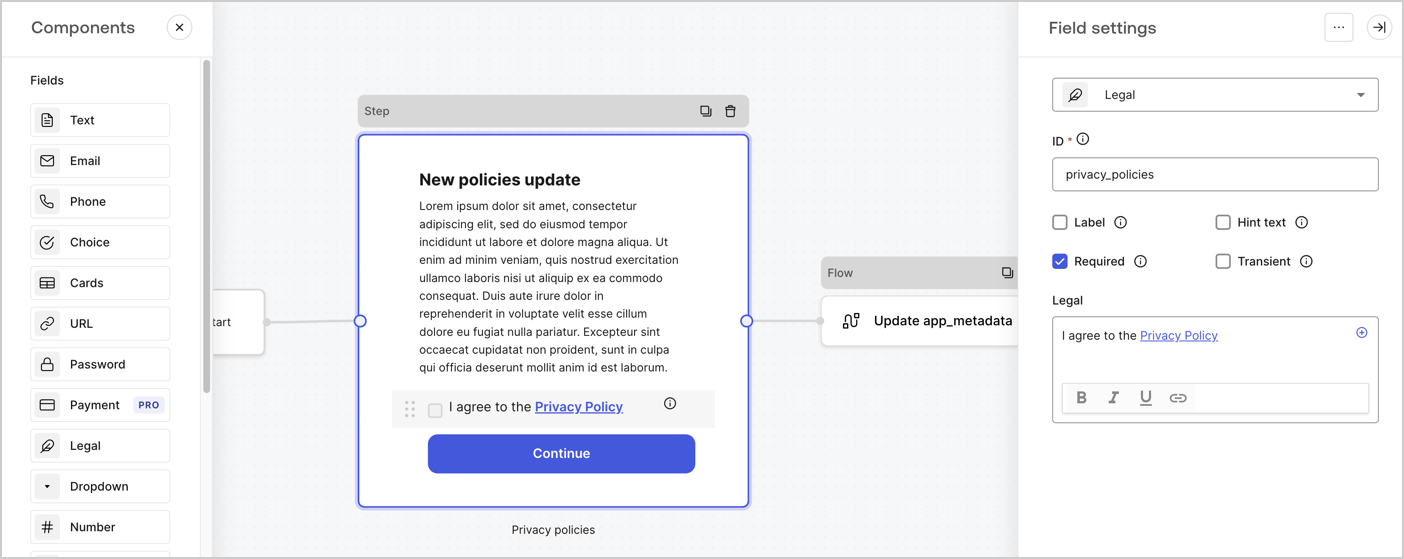
The Step node is the graphical interface visible to users. Add [Fields](/docs/customize/forms/nodes-and-components) to the Step node to collect the new agreement acceptance value by following these steps:

1. Drag a **Rich text** field from the **Components menu** into the **Step** node.

   * **Rich text**: Enter a description of your privacy policies updates.
   * Select **Save**.
2. Drag a **Legal** field into the **Step** node.

   * **ID**: Enter `privacy_policies`.
   * **Required**: Enable the checkbox.
   * **Legal**: Enter `I agree to the Privacy Policy`.
   * Select **Save**.
3. Select **Publish** to save.
<Frame>
  <img src="https://mintcdn.com/docs-dev-feat-init-gt-translations/pK24zKWLhA0dvqKX/docs/images/cdy7uua7fh8z/59zFFjQjAnjogkc2QGIqqJ/0ad66b1b636544122aa4e65968b76c2c/privacy-policy-step-node.png?fit=max&auto=format&n=pK24zKWLhA0dvqKX&q=85&s=47cdec8803d7bb200282f605eb8cc23c" alt="Dashboard > Actions > Forms > Use case privacy policy step node" data-og-width="1404" width="1404" data-og-height="559" height="559" data-path="docs/images/cdy7uua7fh8z/59zFFjQjAnjogkc2QGIqqJ/0ad66b1b636544122aa4e65968b76c2c/privacy-policy-step-node.png" data-optimize="true" data-opv="3" srcset="https://mintcdn.com/docs-dev-feat-init-gt-translations/pK24zKWLhA0dvqKX/docs/images/cdy7uua7fh8z/59zFFjQjAnjogkc2QGIqqJ/0ad66b1b636544122aa4e65968b76c2c/privacy-policy-step-node.png?w=280&fit=max&auto=format&n=pK24zKWLhA0dvqKX&q=85&s=bb576b0e3ae2fbc1d9416fc8112ebe4e 280w, https://mintcdn.com/docs-dev-feat-init-gt-translations/pK24zKWLhA0dvqKX/docs/images/cdy7uua7fh8z/59zFFjQjAnjogkc2QGIqqJ/0ad66b1b636544122aa4e65968b76c2c/privacy-policy-step-node.png?w=560&fit=max&auto=format&n=pK24zKWLhA0dvqKX&q=85&s=426ef5e0cf784388ccebed6e3662dd92 560w, https://mintcdn.com/docs-dev-feat-init-gt-translations/pK24zKWLhA0dvqKX/docs/images/cdy7uua7fh8z/59zFFjQjAnjogkc2QGIqqJ/0ad66b1b636544122aa4e65968b76c2c/privacy-policy-step-node.png?w=840&fit=max&auto=format&n=pK24zKWLhA0dvqKX&q=85&s=e59576575733cb992ca213d52c571048 840w, https://mintcdn.com/docs-dev-feat-init-gt-translations/pK24zKWLhA0dvqKX/docs/images/cdy7uua7fh8z/59zFFjQjAnjogkc2QGIqqJ/0ad66b1b636544122aa4e65968b76c2c/privacy-policy-step-node.png?w=1100&fit=max&auto=format&n=pK24zKWLhA0dvqKX&q=85&s=2c5923733b1649b535c8a148024278e7 1100w, https://mintcdn.com/docs-dev-feat-init-gt-translations/pK24zKWLhA0dvqKX/docs/images/cdy7uua7fh8z/59zFFjQjAnjogkc2QGIqqJ/0ad66b1b636544122aa4e65968b76c2c/privacy-policy-step-node.png?w=1650&fit=max&auto=format&n=pK24zKWLhA0dvqKX&q=85&s=f71aadf5b1c8f637fd2ee1bf7ac47eb2 1650w, https://mintcdn.com/docs-dev-feat-init-gt-translations/pK24zKWLhA0dvqKX/docs/images/cdy7uua7fh8z/59zFFjQjAnjogkc2QGIqqJ/0ad66b1b636544122aa4e65968b76c2c/privacy-policy-step-node.png?w=2500&fit=max&auto=format&n=pK24zKWLhA0dvqKX&q=85&s=7bb495b25930bbbd4af64b0e7240df39 2500w" />
</Frame>

### Configure the Flow node

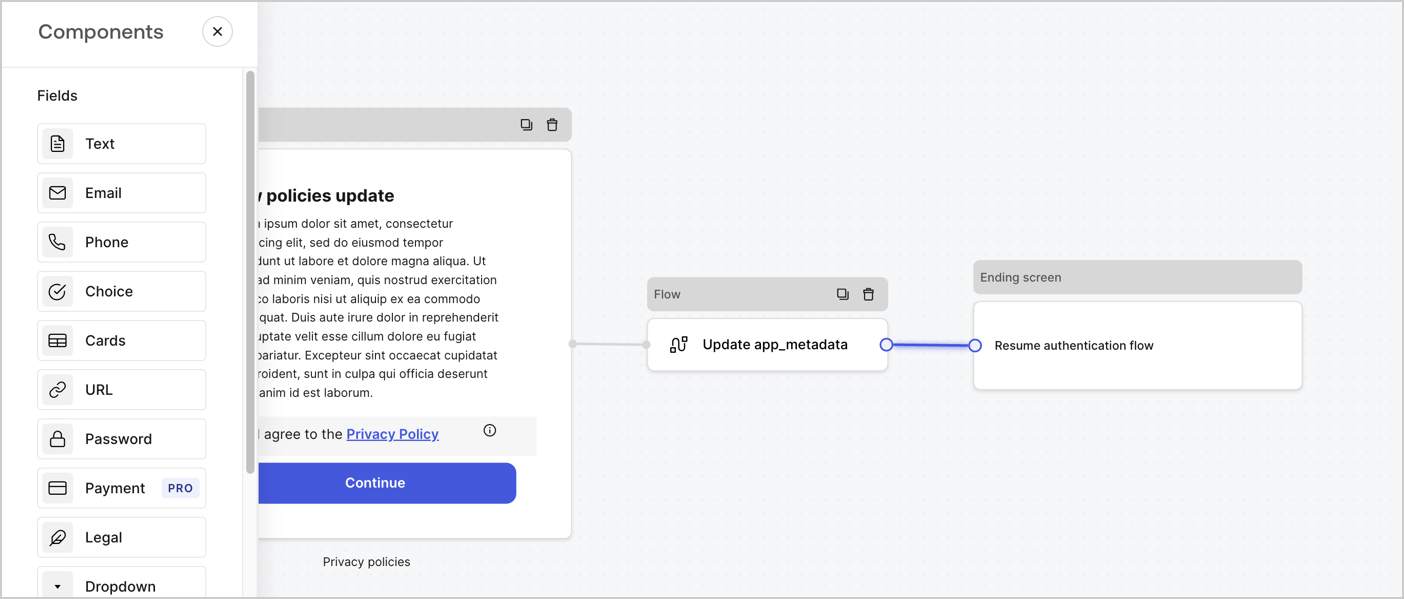
Add a **Flow** node after the **Step** node to update the `app_metadata` and resume the authentication flow by following these steps:

1. Select **Flow** from the bottom of the Form editor.
2. Remove the existing link between the **Step** and **Ending Screen** nodes.
3. Select the new **Flow** > **Click to add a flow** > **Create a new flow.**

   * Enter `Update app_metadata` in the **Name** field.
   * Select **Create**.
   * Select **Save**.
4. Link the **Flow** node to the **Step** and **Ending Screen** nodes as pictured below.
5. Select **Publish** to save.
<Frame>
  <img src="https://mintcdn.com/docs-dev-feat-init-gt-translations/ga3rC1_4s-OF6Vr-/docs/images/cdy7uua7fh8z/6YIkzm7SrpM9LW76AXuRzh/353c518fe82bbaa440836da1d83596d6/link-policies.png?fit=max&auto=format&n=ga3rC1_4s-OF6Vr-&q=85&s=a49942272cb50a8089e0d8a77c38d1d0" alt="Dashboard > Actions > Forms > Form" data-og-width="1404" width="1404" data-og-height="599" height="599" data-path="docs/images/cdy7uua7fh8z/6YIkzm7SrpM9LW76AXuRzh/353c518fe82bbaa440836da1d83596d6/link-policies.png" data-optimize="true" data-opv="3" srcset="https://mintcdn.com/docs-dev-feat-init-gt-translations/ga3rC1_4s-OF6Vr-/docs/images/cdy7uua7fh8z/6YIkzm7SrpM9LW76AXuRzh/353c518fe82bbaa440836da1d83596d6/link-policies.png?w=280&fit=max&auto=format&n=ga3rC1_4s-OF6Vr-&q=85&s=758072fedbf6a107b003305eafd53f51 280w, https://mintcdn.com/docs-dev-feat-init-gt-translations/ga3rC1_4s-OF6Vr-/docs/images/cdy7uua7fh8z/6YIkzm7SrpM9LW76AXuRzh/353c518fe82bbaa440836da1d83596d6/link-policies.png?w=560&fit=max&auto=format&n=ga3rC1_4s-OF6Vr-&q=85&s=765e344f8693df49dff6be8cacc34f22 560w, https://mintcdn.com/docs-dev-feat-init-gt-translations/ga3rC1_4s-OF6Vr-/docs/images/cdy7uua7fh8z/6YIkzm7SrpM9LW76AXuRzh/353c518fe82bbaa440836da1d83596d6/link-policies.png?w=840&fit=max&auto=format&n=ga3rC1_4s-OF6Vr-&q=85&s=64cb05af2eade4b8e050cf5b03b6be6c 840w, https://mintcdn.com/docs-dev-feat-init-gt-translations/ga3rC1_4s-OF6Vr-/docs/images/cdy7uua7fh8z/6YIkzm7SrpM9LW76AXuRzh/353c518fe82bbaa440836da1d83596d6/link-policies.png?w=1100&fit=max&auto=format&n=ga3rC1_4s-OF6Vr-&q=85&s=0ffed8778d6491db098102b122f69b58 1100w, https://mintcdn.com/docs-dev-feat-init-gt-translations/ga3rC1_4s-OF6Vr-/docs/images/cdy7uua7fh8z/6YIkzm7SrpM9LW76AXuRzh/353c518fe82bbaa440836da1d83596d6/link-policies.png?w=1650&fit=max&auto=format&n=ga3rC1_4s-OF6Vr-&q=85&s=ef378032e91d51a706193da338e15d39 1650w, https://mintcdn.com/docs-dev-feat-init-gt-translations/ga3rC1_4s-OF6Vr-/docs/images/cdy7uua7fh8z/6YIkzm7SrpM9LW76AXuRzh/353c518fe82bbaa440836da1d83596d6/link-policies.png?w=2500&fit=max&auto=format&n=ga3rC1_4s-OF6Vr-&q=85&s=52dbbb81471770f7f9ef44ee6882d437 2500w" />
</Frame>

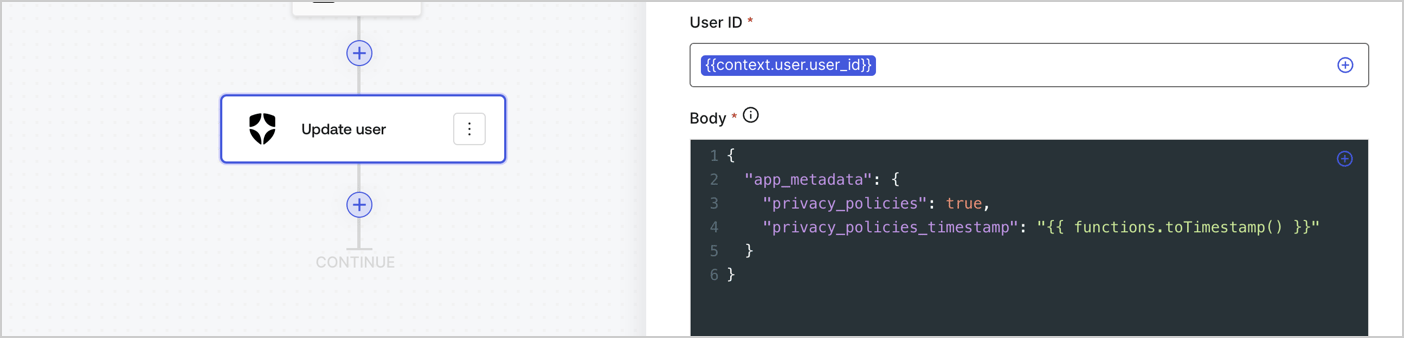
Add an Auth0 Update user action to the flow by following these steps:

1. Select the **Flow** **Update app\_metadata** > **Edit flow** to open the Flow editor in a new tab.
2. Below the StartAction, select the **+** icon to add an **Update user** action. Complete the fields below, then select **Save** to continue.

   * **Connection**: Select from the dropdown the Vault connection to your M2M application.

   * **User ID**: Enter `{{context.user.user_id}}`.

   * **Body**: Copy and paste the following code to update the app\_metadata with the privacy\_policies and privacy\_policies\_timestamp properties.

     ```text lines theme={null}
     {
       "app_metadata": {
         "privacy_policies": true,
         "privacy_policies_timestamp": "{{ functions.toTimestamp() }}"
       }
     }
     ```

   * Select **Save**.
3. Select **Publish** to save.
<Frame>
  <img src="https://mintcdn.com/docs-dev-feat-init-gt-translations/ZmqODkbyV9Q5Sot2/docs/images/cdy7uua7fh8z/CvMNIwWrOUwaFW4X3G28p/1fb70ae57a20749d9ffaaba8dc0b7e26/update-user-privacy.png?fit=max&auto=format&n=ZmqODkbyV9Q5Sot2&q=85&s=c5c5db013960681c21083ea8988aa32e" alt="Dashboard > Actions > Forms > User case privacy policy code" data-og-width="1404" width="1404" data-og-height="338" height="338" data-path="docs/images/cdy7uua7fh8z/CvMNIwWrOUwaFW4X3G28p/1fb70ae57a20749d9ffaaba8dc0b7e26/update-user-privacy.png" data-optimize="true" data-opv="3" srcset="https://mintcdn.com/docs-dev-feat-init-gt-translations/ZmqODkbyV9Q5Sot2/docs/images/cdy7uua7fh8z/CvMNIwWrOUwaFW4X3G28p/1fb70ae57a20749d9ffaaba8dc0b7e26/update-user-privacy.png?w=280&fit=max&auto=format&n=ZmqODkbyV9Q5Sot2&q=85&s=b69bfc4909b22e2cb1c50283a7fb8d70 280w, https://mintcdn.com/docs-dev-feat-init-gt-translations/ZmqODkbyV9Q5Sot2/docs/images/cdy7uua7fh8z/CvMNIwWrOUwaFW4X3G28p/1fb70ae57a20749d9ffaaba8dc0b7e26/update-user-privacy.png?w=560&fit=max&auto=format&n=ZmqODkbyV9Q5Sot2&q=85&s=ce00ba5f79d48c2930f48d4041063e06 560w, https://mintcdn.com/docs-dev-feat-init-gt-translations/ZmqODkbyV9Q5Sot2/docs/images/cdy7uua7fh8z/CvMNIwWrOUwaFW4X3G28p/1fb70ae57a20749d9ffaaba8dc0b7e26/update-user-privacy.png?w=840&fit=max&auto=format&n=ZmqODkbyV9Q5Sot2&q=85&s=eab75289906d17de49e2df3dfafa5957 840w, https://mintcdn.com/docs-dev-feat-init-gt-translations/ZmqODkbyV9Q5Sot2/docs/images/cdy7uua7fh8z/CvMNIwWrOUwaFW4X3G28p/1fb70ae57a20749d9ffaaba8dc0b7e26/update-user-privacy.png?w=1100&fit=max&auto=format&n=ZmqODkbyV9Q5Sot2&q=85&s=3569e5f81f2b3c65a9822a84428bfc9d 1100w, https://mintcdn.com/docs-dev-feat-init-gt-translations/ZmqODkbyV9Q5Sot2/docs/images/cdy7uua7fh8z/CvMNIwWrOUwaFW4X3G28p/1fb70ae57a20749d9ffaaba8dc0b7e26/update-user-privacy.png?w=1650&fit=max&auto=format&n=ZmqODkbyV9Q5Sot2&q=85&s=eb154544315f63a0f4e117caebbd5a7f 1650w, https://mintcdn.com/docs-dev-feat-init-gt-translations/ZmqODkbyV9Q5Sot2/docs/images/cdy7uua7fh8z/CvMNIwWrOUwaFW4X3G28p/1fb70ae57a20749d9ffaaba8dc0b7e26/update-user-privacy.png?w=2500&fit=max&auto=format&n=ZmqODkbyV9Q5Sot2&q=85&s=c384496b9f1ad4714df8dfc718fc87fe 2500w" />
</Frame>

<Callout icon="file-lines" color="#0EA5E9" iconType="regular">
  The flow **Update app\_metadata** adds a `privacy_policies true` value to the app`_metadata` object and also generates a timestamp with a [helper function.](/docs/customize/forms/variables)
</Callout>

## Retrieve the form render code

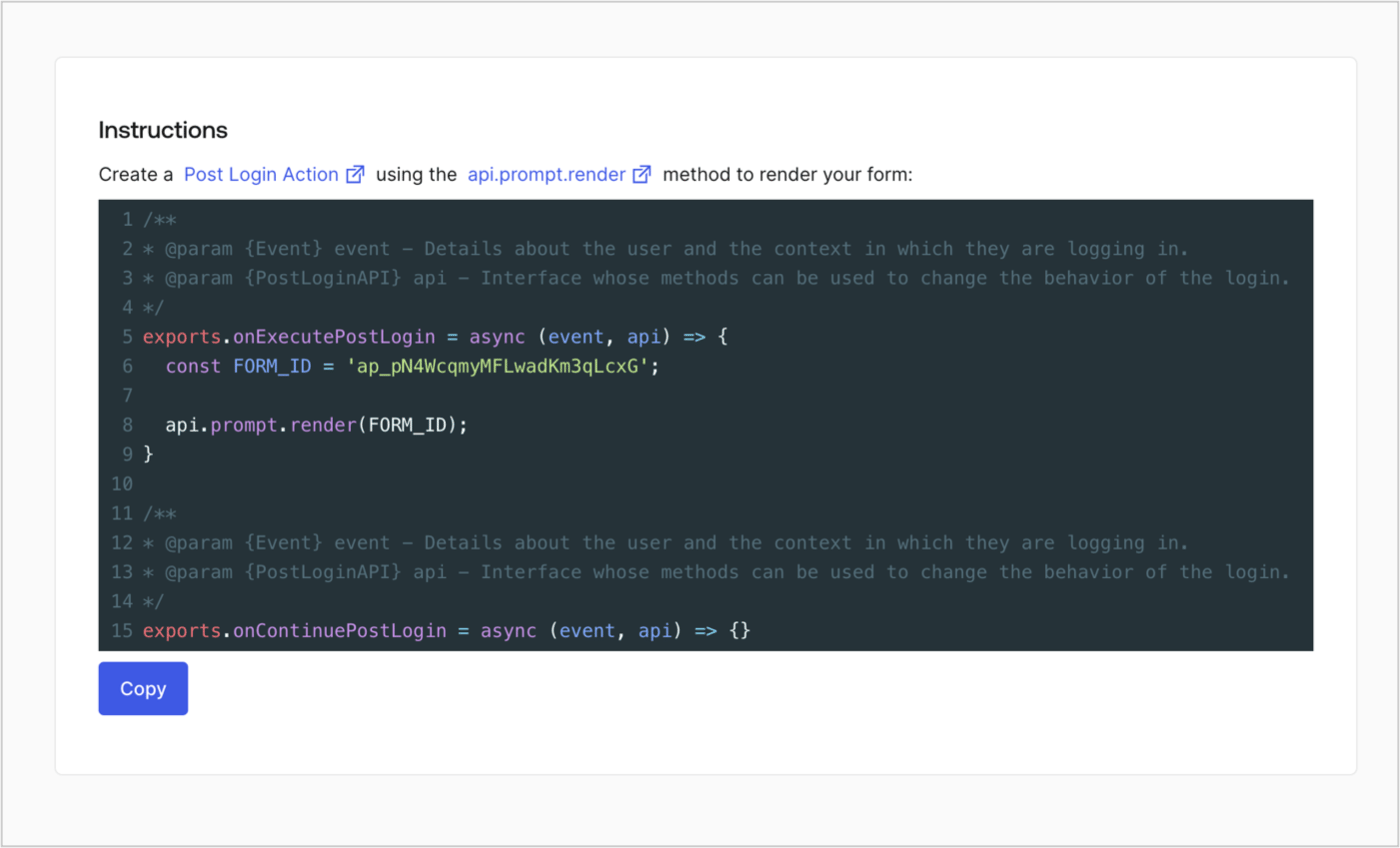
Retrieve your form render code to visually render the form with a custom Post Login Action by following these steps:

* From the Form editor, select **`<> Render`**.
* Select **Copy**.
<Frame>
  <img src="https://mintcdn.com/docs-dev-feat-init-gt-translations/2ut5cR-lHY2UVI81/docs/images/cdy7uua7fh8z/2EIUzc539sq9lwoTKbjoJv/496a864c0fc44a782c9cadca119dbfb0/embed.png?fit=max&auto=format&n=2ut5cR-lHY2UVI81&q=85&s=c58280f0219735500bc5aa06b7a486f8" alt="Dashboard > Actions > Forms > Form > Embed" data-og-width="1400" width="1400" data-og-height="848" height="848" data-path="docs/images/cdy7uua7fh8z/2EIUzc539sq9lwoTKbjoJv/496a864c0fc44a782c9cadca119dbfb0/embed.png" data-optimize="true" data-opv="3" srcset="https://mintcdn.com/docs-dev-feat-init-gt-translations/2ut5cR-lHY2UVI81/docs/images/cdy7uua7fh8z/2EIUzc539sq9lwoTKbjoJv/496a864c0fc44a782c9cadca119dbfb0/embed.png?w=280&fit=max&auto=format&n=2ut5cR-lHY2UVI81&q=85&s=fc9bde66ccd8faca3250e0732d6b5248 280w, https://mintcdn.com/docs-dev-feat-init-gt-translations/2ut5cR-lHY2UVI81/docs/images/cdy7uua7fh8z/2EIUzc539sq9lwoTKbjoJv/496a864c0fc44a782c9cadca119dbfb0/embed.png?w=560&fit=max&auto=format&n=2ut5cR-lHY2UVI81&q=85&s=dc43ebccfce206094e2a59c90b1a46d1 560w, https://mintcdn.com/docs-dev-feat-init-gt-translations/2ut5cR-lHY2UVI81/docs/images/cdy7uua7fh8z/2EIUzc539sq9lwoTKbjoJv/496a864c0fc44a782c9cadca119dbfb0/embed.png?w=840&fit=max&auto=format&n=2ut5cR-lHY2UVI81&q=85&s=82ff98862cec1dbe8651f5e468315021 840w, https://mintcdn.com/docs-dev-feat-init-gt-translations/2ut5cR-lHY2UVI81/docs/images/cdy7uua7fh8z/2EIUzc539sq9lwoTKbjoJv/496a864c0fc44a782c9cadca119dbfb0/embed.png?w=1100&fit=max&auto=format&n=2ut5cR-lHY2UVI81&q=85&s=b474d89dfb7de3146e6251280d44b49c 1100w, https://mintcdn.com/docs-dev-feat-init-gt-translations/2ut5cR-lHY2UVI81/docs/images/cdy7uua7fh8z/2EIUzc539sq9lwoTKbjoJv/496a864c0fc44a782c9cadca119dbfb0/embed.png?w=1650&fit=max&auto=format&n=2ut5cR-lHY2UVI81&q=85&s=08659d93e88824f29d1f4664409fb587 1650w, https://mintcdn.com/docs-dev-feat-init-gt-translations/2ut5cR-lHY2UVI81/docs/images/cdy7uua7fh8z/2EIUzc539sq9lwoTKbjoJv/496a864c0fc44a782c9cadca119dbfb0/embed.png?w=2500&fit=max&auto=format&n=2ut5cR-lHY2UVI81&q=85&s=4f15acc7d76240608f9ac651944a264f 2500w" />
</Frame>

## Create a Post Login Action

Create a post-login Action to render your form by following these steps:

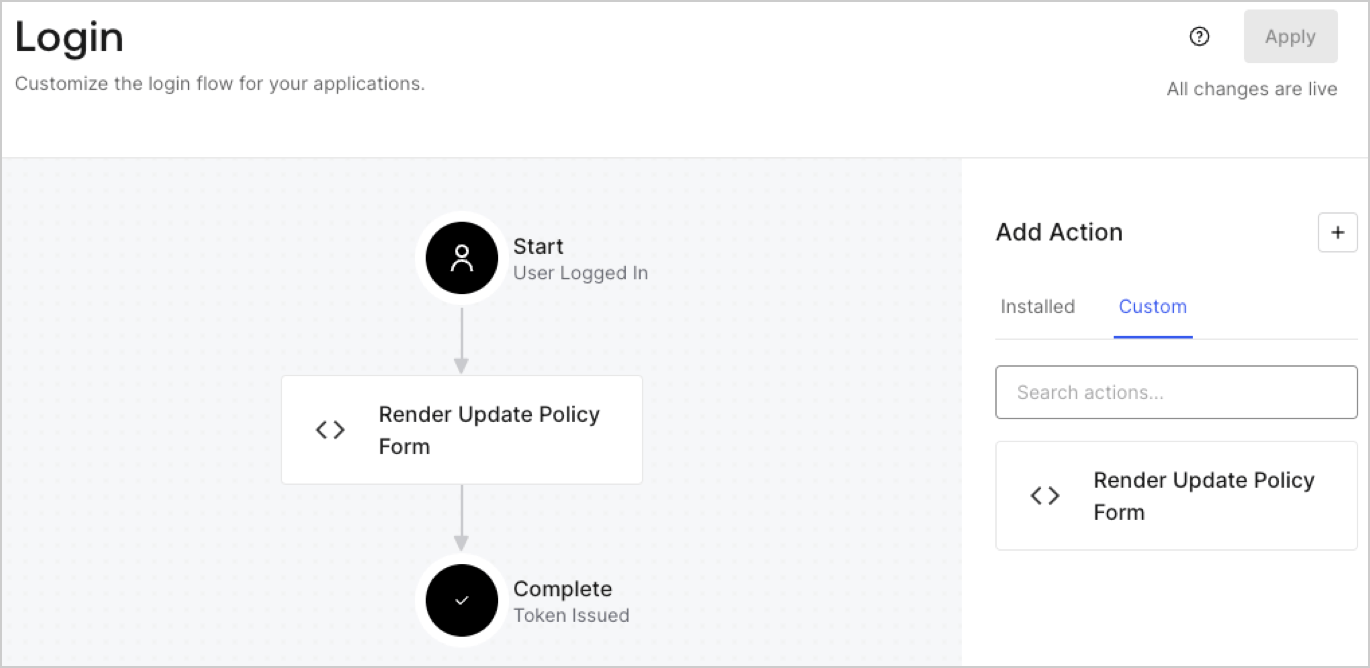
1. Navigate to **Auth0 Dashboard > Actions > Flows > Login.**
2. Select the **+** icon and Select **Build from scratch**:

   * **Name**: Enter `Render Update Policy Form`.
   * **Trigger**: Select `Login / Post Login`.
   * **Runtime**: Select the recommended version.
3. Select **Create**.

To configure the post-login Action:

1. Delete the existing code from the Code editor.
2. Paste the form render code into the Code editor.
3. Edit the code to define the conditional logic that will render the form.

   ```javascript lines theme={null}
   /**
   * @param {Event} event - Details about the user and the context in which they are logging in.
   * @param {PostLoginAPI} api - Interface whose methods can be used to change the behavior of the login.
   */
   exports.onExecutePostLogin = async (event, api) => {
     const FORM_ID = 'REPLACE_WITH_YOUR_FORM_ID';

     if (event.user.app_metadata.privacy_policies !== true) {
       api.prompt.render(FORM_ID);
     }
   }

   exports.onContinuePostLogin = async (event, api) => { }
   ```

   <Callout icon="file-lines" color="#0EA5E9" iconType="regular">
     The example code above will render the form when a user is missing the app metadata `privacy_policies` property.
   </Callout>
4. Select **Deploy.**
5. Drag and Drop the **Render Update Policy Form** Action to the **Login** flow.
   <Frame>
     <img src="https://mintcdn.com/docs-dev-feat-init-gt-translations/ZC0XT2ZcfW-tPJd_/docs/images/cdy7uua7fh8z/5TOwDgevZsBqd7yZynUYWU/41ca909dc3007aed4f40ff794a05efa5/postlogin.png?fit=max&auto=format&n=ZC0XT2ZcfW-tPJd_&q=85&s=c4019459f2b6147b47baf97e736869e8" alt="Dashboard > Forms > Use Case > Render update policy form login action" data-og-width="1370" width="1370" data-og-height="668" height="668" data-path="docs/images/cdy7uua7fh8z/5TOwDgevZsBqd7yZynUYWU/41ca909dc3007aed4f40ff794a05efa5/postlogin.png" data-optimize="true" data-opv="3" srcset="https://mintcdn.com/docs-dev-feat-init-gt-translations/ZC0XT2ZcfW-tPJd_/docs/images/cdy7uua7fh8z/5TOwDgevZsBqd7yZynUYWU/41ca909dc3007aed4f40ff794a05efa5/postlogin.png?w=280&fit=max&auto=format&n=ZC0XT2ZcfW-tPJd_&q=85&s=2cabfb376b9a706a7d83cc93eabedf96 280w, https://mintcdn.com/docs-dev-feat-init-gt-translations/ZC0XT2ZcfW-tPJd_/docs/images/cdy7uua7fh8z/5TOwDgevZsBqd7yZynUYWU/41ca909dc3007aed4f40ff794a05efa5/postlogin.png?w=560&fit=max&auto=format&n=ZC0XT2ZcfW-tPJd_&q=85&s=017010eff3cf549c02b634fe6a5263f7 560w, https://mintcdn.com/docs-dev-feat-init-gt-translations/ZC0XT2ZcfW-tPJd_/docs/images/cdy7uua7fh8z/5TOwDgevZsBqd7yZynUYWU/41ca909dc3007aed4f40ff794a05efa5/postlogin.png?w=840&fit=max&auto=format&n=ZC0XT2ZcfW-tPJd_&q=85&s=112ba3c40170813e925cec01e7ed37b2 840w, https://mintcdn.com/docs-dev-feat-init-gt-translations/ZC0XT2ZcfW-tPJd_/docs/images/cdy7uua7fh8z/5TOwDgevZsBqd7yZynUYWU/41ca909dc3007aed4f40ff794a05efa5/postlogin.png?w=1100&fit=max&auto=format&n=ZC0XT2ZcfW-tPJd_&q=85&s=11bec0fdb8f64018c6493cdab9d93665 1100w, https://mintcdn.com/docs-dev-feat-init-gt-translations/ZC0XT2ZcfW-tPJd_/docs/images/cdy7uua7fh8z/5TOwDgevZsBqd7yZynUYWU/41ca909dc3007aed4f40ff794a05efa5/postlogin.png?w=1650&fit=max&auto=format&n=ZC0XT2ZcfW-tPJd_&q=85&s=93d1be60763a27659e4f8306b1da0cfd 1650w, https://mintcdn.com/docs-dev-feat-init-gt-translations/ZC0XT2ZcfW-tPJd_/docs/images/cdy7uua7fh8z/5TOwDgevZsBqd7yZynUYWU/41ca909dc3007aed4f40ff794a05efa5/postlogin.png?w=2500&fit=max&auto=format&n=ZC0XT2ZcfW-tPJd_&q=85&s=a45f9587cf36f5ede29b474493997fda 2500w" />
   </Frame>
6. Select **Apply.**

### Test implementation

Test the implementation by following these steps:

1. Log in with an existing user whose app`_metadata` attribute `privacy_policies` does not have a value.
2. The post-login Action in the Login flow will render the form and prompt for acceptance.
3. Select **Auth0 Dashboard > User Management > Users,** locate the user and verify that the `app_metadata` attribute `privacy_policies` contains a `true` value and a timestamp.
